IG Hero · Account Recovery Playbook · 2026 Edition
Instagram Disabled Your Account For "No Reason" —
Here's Why Your Appeal Keeps Failing
The real 2026 playbook for diagnosing your exact scenario, running the right escalation, and beating the 30-day recovery clock.
⚡ Quick Take — What You Need to Know
What's in this guide
- Why was my Instagram account disabled when I didn't do anything?
- Which type of "disabled" are you actually dealing with?
- What should I do in the first 24 hours?
- How do I submit an Instagram appeal that actually works?
- Why does my appeal keep getting denied — and is it really over?
- How long do I have to recover a disabled Instagram account?
- What should I actually write in my Instagram appeal?
- What can I do while waiting for Instagram to respond?
- Edge cases & common mistakes that kill recovery
- Real case study: why doing things in the wrong order makes recovery so much harder
- Instagram disabled-account FAQ
You opened the app, typed your password, and got hit with the worst sentence on the internet: "We suspended your account…"
You didn't violate anything. You didn't post anything weird. You didn't even log in from a new device. And now years of photos, DMs, and followers are sitting behind a wall you can't break.
If you're here, you've probably already submitted an appeal. Maybe two. Maybe ten. Maybe you already did the video verification and got radio silence — or worse, the gut-punch line: "We've disabled your account and our decision is final."
Here's the truth no one tells you: most people fail to recover their disabled Instagram account because they're sending the wrong appeal through the wrong channel at the wrong time. Recovery isn't about appealing harder. It's about appealing smarter — and that starts with knowing exactly what kind of "disabled" you're dealing with.
This is the playbook that gives you the highest realistic chance of recovery.
Already exhausted the standard appeal?
The IG HERO Instagram Recovery Guide documents the multi-channel escalation paths that recover accounts after final-decision messages, no-appeal-button scenarios, and repeated denials.
See the IG HERO Recovery Guide →Why Was My Instagram Account Disabled When I Didn't Do Anything?
In 2026, the vast majority of "no reason" disables are triggered by Instagram's automated AI moderation — not human reviewers. The system flags accounts based on behavior patterns (same mobile phone connected to multiple accounts, rapid follows, login from a new IP, mass DMs, third-party app activity), reports from other users, or links to other already-disabled accounts.
Your account being "innocent" isn't really the question the algorithm is answering. The question is: which behavioral signal tripped the system?
The 5 most common silent triggers in 2026
Behavior spikes
False positive for CSE (e.g., posting children's photos), mass following or unfollowing, liking 200+ posts in an hour, joining a giveaway loop, or DMing dozens of strangers in a short window.
Device or IP anomalies
Logging in from a new country, switching between Wi-Fi and mobile data quickly, or being on a shared/VPN IP that other banned accounts have also used.
Linked-account chain bans
If a Facebook or Instagram account in your Accounts Center gets disabled, the system can ripple through and disable everything connected — even your business account that did nothing wrong.
Third-party app connections
Schedulers, growth tools, follow/unfollow bots — even legitimate-looking ones can leave a signature Meta flags as suspicious automation.
Mass reports
A coordinated wave of reports from rivals, exes, or trolls is enough to trigger automated review — even when the underlying content is fine. In milder cases the same trigger can show up as a sudden reach collapse before a full disable.
Why this matters for your appeal
If your case is a false positive (most are), the recovery goal isn't to argue — it's to get a human to look at it. The standard in-app appeal form is reviewed by the same algorithm that disabled you. That's why so many people loop into auto-denials. Meta's own Community Standards page confirms enforcement uses both technology and human reviewers — the entire game is escalating from the first to the second.
Which Type of "Disabled" Are You Actually Dealing With?
There are five distinct disabled-account scenarios in 2026, and each one needs a different recovery sequence. Before you submit one more appeal, take 60 seconds and figure out exactly which one you're in. Sending the wrong appeal to the wrong scenario is the #1 reason recoveries fail.
The 5-scenario decision tree
Try to log in. What do you see?
"Appeal" button visible on the disable screen
Your account is in the standard appeal path. Path → Method 1 (in-app appeal) first, then escalate if it fails.
"Your account has been disabled" with NO appeal button
Only "Log Out" or "Download Your Information" visible. The standard appeal route is closed (or never opened). Path → Method 2, Method 3 (Meta Business Support), Method 4, or Method 5 (specialist escalation).
You submitted the selfie/video and it's been more than 3 days with no response
Your verification is stuck in a queue or got auto-rejected silently. Path → Method 2, Method 3, Method 4, or Method 5 escalation.
"We've reviewed your account and our decision is final"
The standard channel is exhausted. Path → Method 4 (Meta Verified) or Method 5 (specialist escalation). Many "final" decisions have been overturned through the right channel.
Linked-account chain ban (FB and IG both disabled)
Your Facebook or another IG account got disabled and dragged this one with it (or vice versa). A lot of online tutorials tell you to recover the upstream account first and let the downstream auto-restore. That is often not the case. You should appeal for both accounts independently and simultaneously.
What each scenario looks like on screen
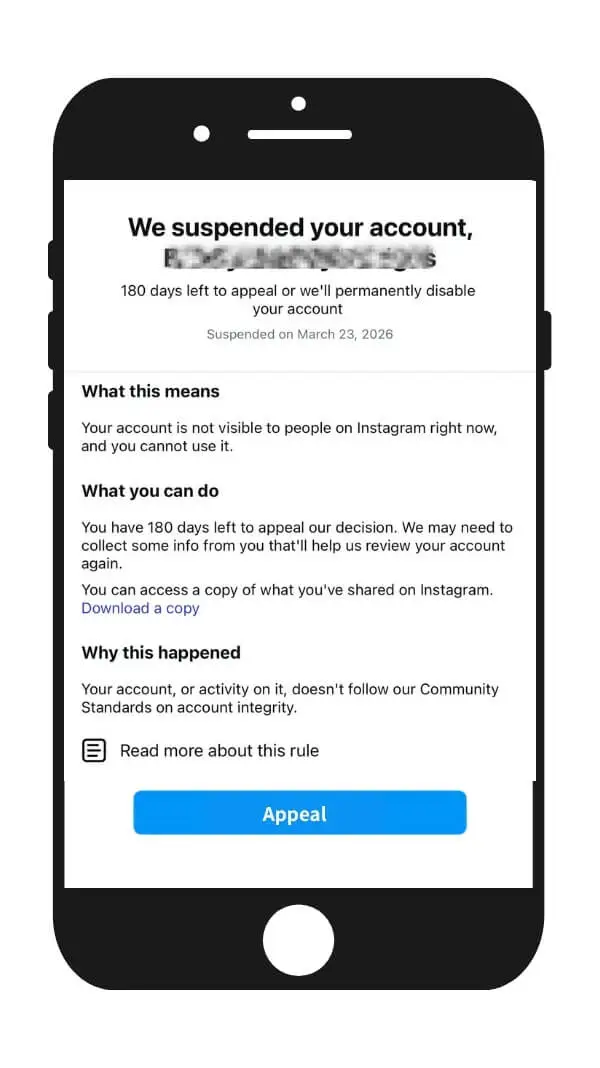
Scenario A — the appeal button is visible. This is your green light to use Method 1 first.
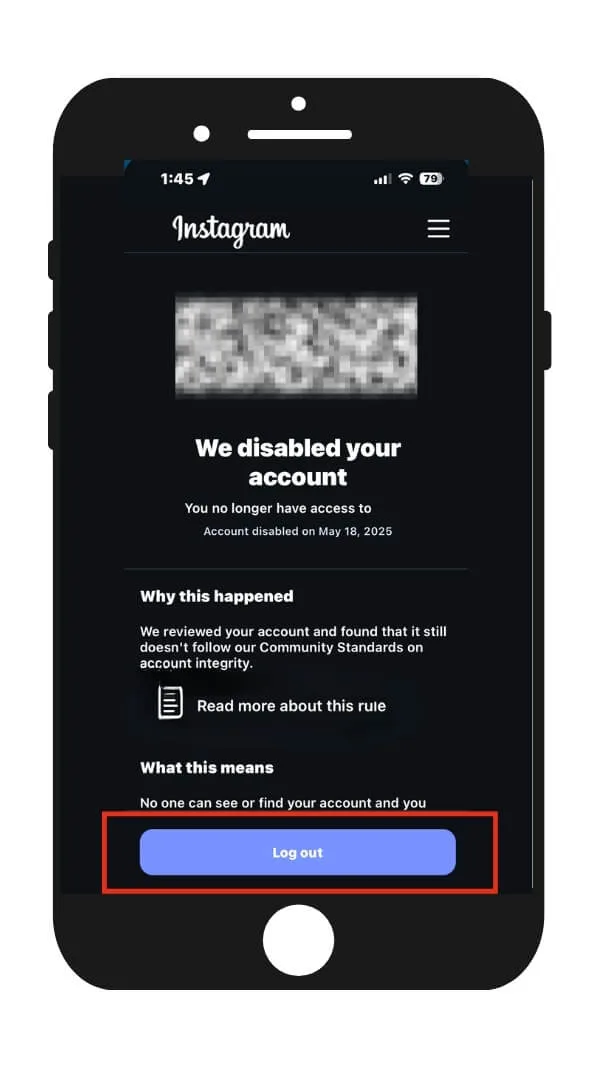
Scenario B — no appeal button at all. The standard route never opened for you.
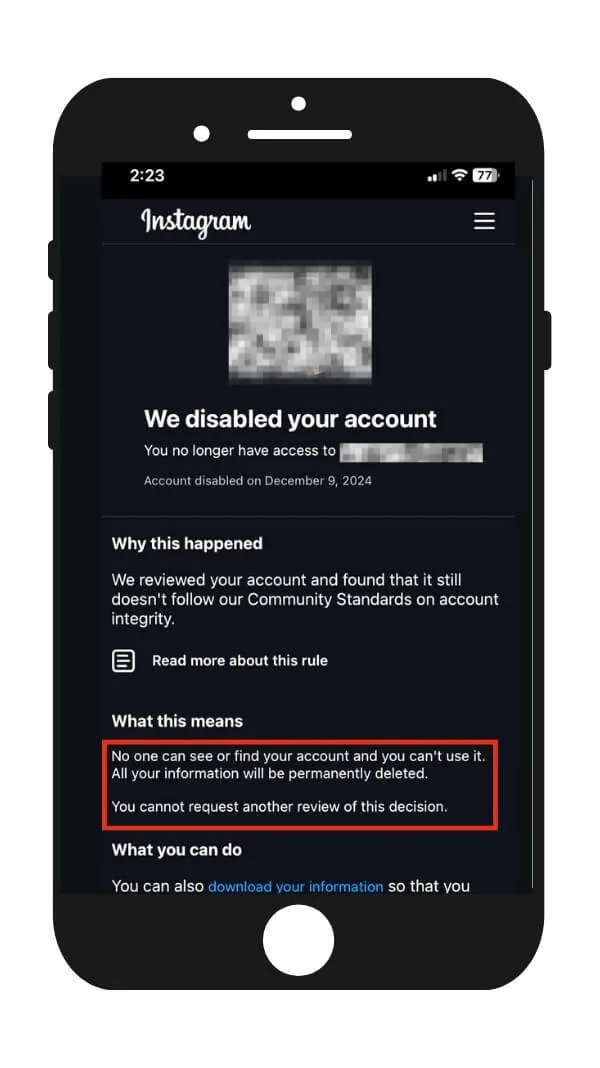
Scenario D — the dreaded "decision is final" message. Not the end. Just a routing signal.
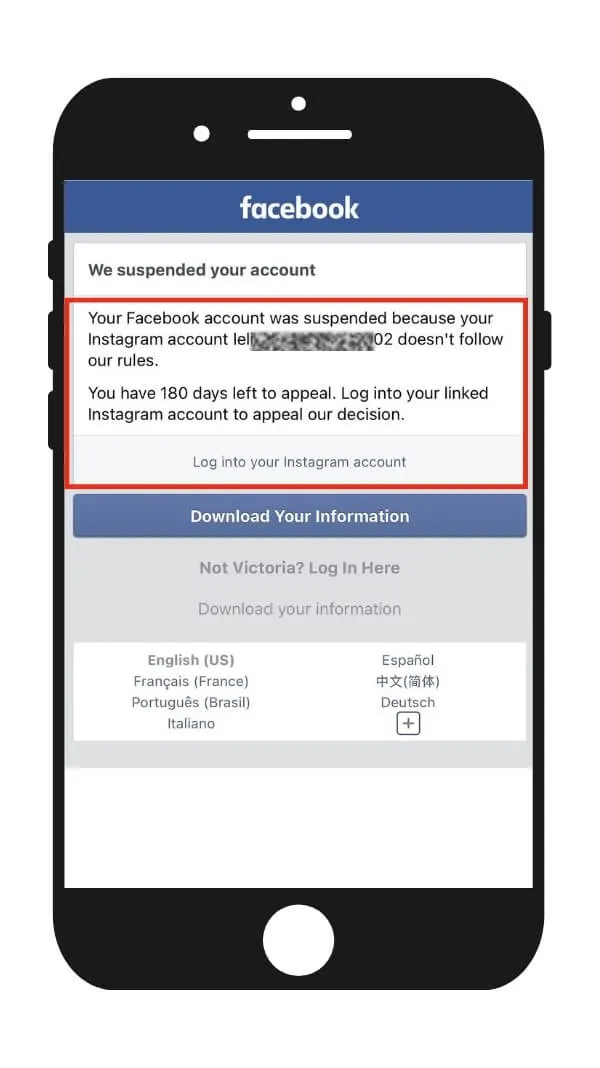
Scenario E — your Facebook is also disabled because of the Instagram suspension (or vice versa). This needs parallel appeals.
Two risk warnings before you act: Don't submit appeals repeatedly within a short window — your IP will be blacklisted as spam and all future appeals routed to a non-reviewable folder. And if you're in Scenario E and only appeal for one of the two linked accounts, the other one may never be recovered.
💡 Pick one scenario, stick to that path, and only switch lanes after the recommended waiting period for that method. Lane-jumping mid-process is a major reason recoveries stall.
What Should I Do in the First 24 Hours?
The first 24 hours are the highest-leverage window in the entire recovery process. Recovery odds are dramatically higher when you act inside this window — but acting fast only helps if you're acting right. The wrong moves in hour one can sabotage the next 30 days.
The 24-hour action checklist
Stop everything else
Don't try to log in 50 times. Don't make a new account from the same phone. Don't DM Instagram's main account from a friend's phone. Each of those adds suspicious-behavior signals to your case.
Run the scenario diagnostic above (A through E)
Write down which one you're in. This determines literally everything about which channel you use next.
Confirm your linked email and phone are still under your control
If a hacker changed them, your scenario shifts to a hacked-account flow, not a disabled-account flow. The recovery path is completely different.
Submit ONE appeal through the channel that matches your scenario
Not three. Not from three browsers. One. Multiple parallel submissions get flagged as spam and de-prioritized.
Take a screenshot of every screen Instagram shows you
The disable notice, the appeal confirmation, any error message. You'll need these for higher-tier escalation later.
Download your data if the option is available
Use the "Download Your Information" link from the disable screen. Even if you recover, having a local backup of photos and DMs is non-negotiable.
Check your email — including spam — every 4 hours for the first 48
Instagram sometimes asks for additional verification within hours, and missing the reply window resets your case.
What NOT to do in the first 24 hours
Avoid these three mistakes: Don't post about your disable from a backup account tagging Instagram's official handle — it doesn't help and can flag the backup account too. Don't create a new account with the same email, phone, or device fingerprint — Instagram will link them and you'll lose both. Don't submit angry, all-caps appeal messages — human reviewers actually deprioritize them.
💡 Why timing matters: Industry observation across recovery cases shows recovery success rates fall noticeably after day 30, and become very difficult after day 90. Follow the steps and act fast.
How Do I Submit an Instagram Appeal That Actually Works?
There are five working appeal channels in 2026, ranked from "first thing everyone tries" to "last resort that overturns final decisions." Use them in the right order, and don't skip rungs unless your scenario forces you to. The infographic for this post maps the full 5-method escalation flow — bookmark it before you start.
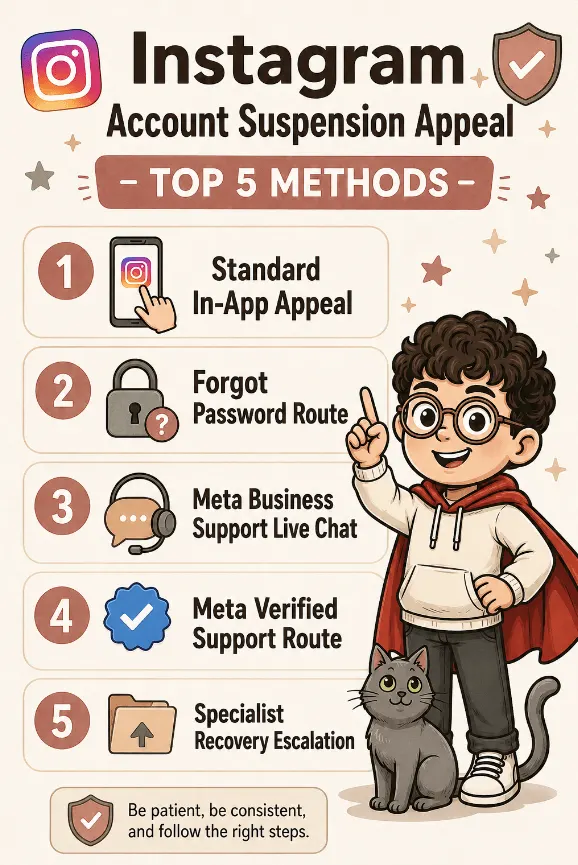
Method 1 — Standard in-app appeal
The required first step
Open Instagram, try to log in. When the disable screen appears, tap "Appeal" or "Request for Review." Confirm your username and the email/phone linked to the account. Write a short message — calm, factual, under 200 words (template in Section 7).
Then take the video selfie according to the in-app instructions. Make sure your face is clearly visible and your background is plain.
- Lighting: Bright, even, daytime light from the front. Not a dim bedroom at midnight.
- Background: Plain wall, ideally white or light grey. No busy patterns, no other people.
- Face: No hat, no sunglasses, no heavy filters, no Snapchat. Recently posted selfies on the disabled account should match what they see now.
You only have one shot at this. Check before you submit. Once submitted, you cannot edit or re-submit.
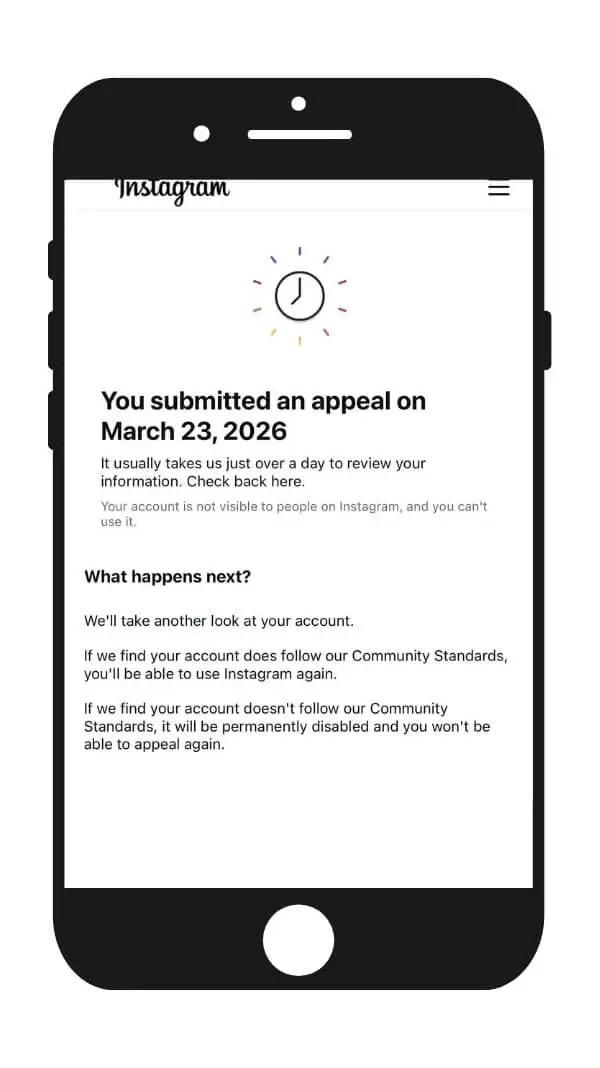
If the appeal is successfully submitted, you'll see a confirmation screen and usually get an updated notification within 48 hours.
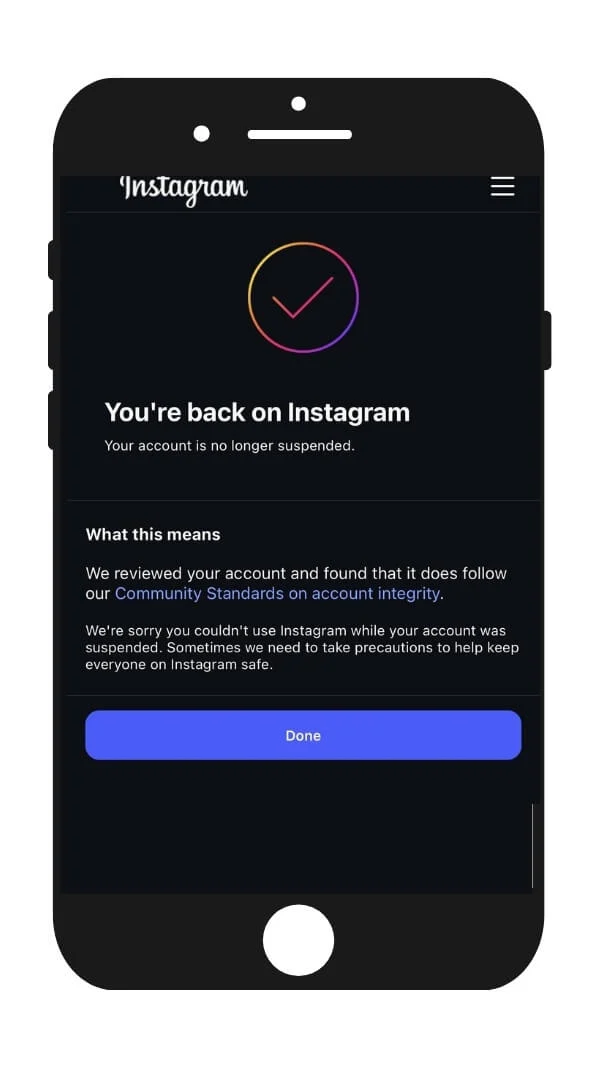
If the appeal passes review, you'll see a "You're back on Instagram" notification when you log in.
If the appeal fails review, you'll see the "We Disabled Your Account" notification — and the standard channel is now closed for you. Move to Method 3, 4, or 5.
Realistic expectation for Method 1
This channel is reviewed largely by the same automated system that disabled you, so it has the lowest standalone success rate. But it's required as a paper trail before higher-tier escalations. Treat it as a checkbox, not your only hope.
Risk warning: Sending a verification that fails the first match is far worse than not sending one. The system can mark your account as "identity mismatch / low trust" and push it into a non-reviewable queue. Treat this like a passport photo, not a story.
Method 2 — Forgot Password route
This is a quick alternative path that lets you re-trigger an identity review even if your standard appeal got swallowed.
Step 1: Open Instagram on your phone and tap "Forgot Password" on the login page.
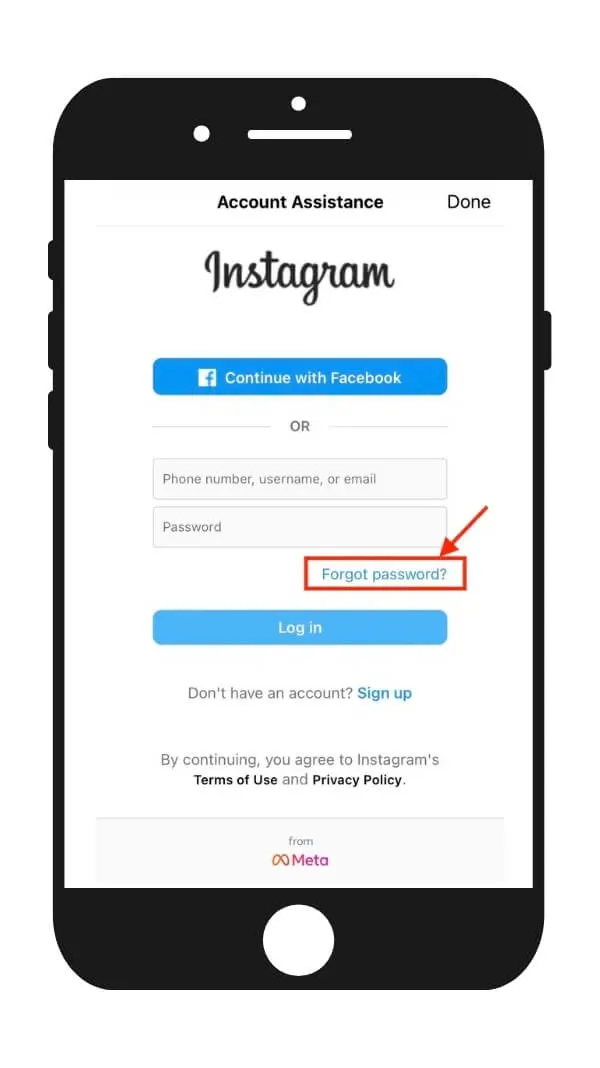
Step 2: Tap "Can't Reset Your Password."
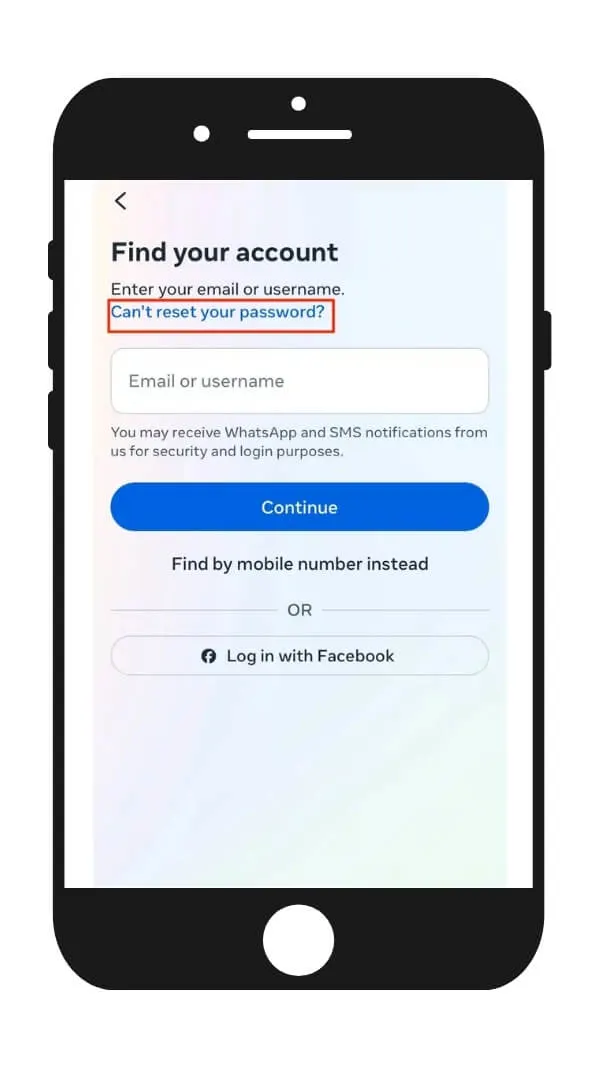
Step 3: Tap "If you think your Instagram account has been hacked," then "Visit this page."
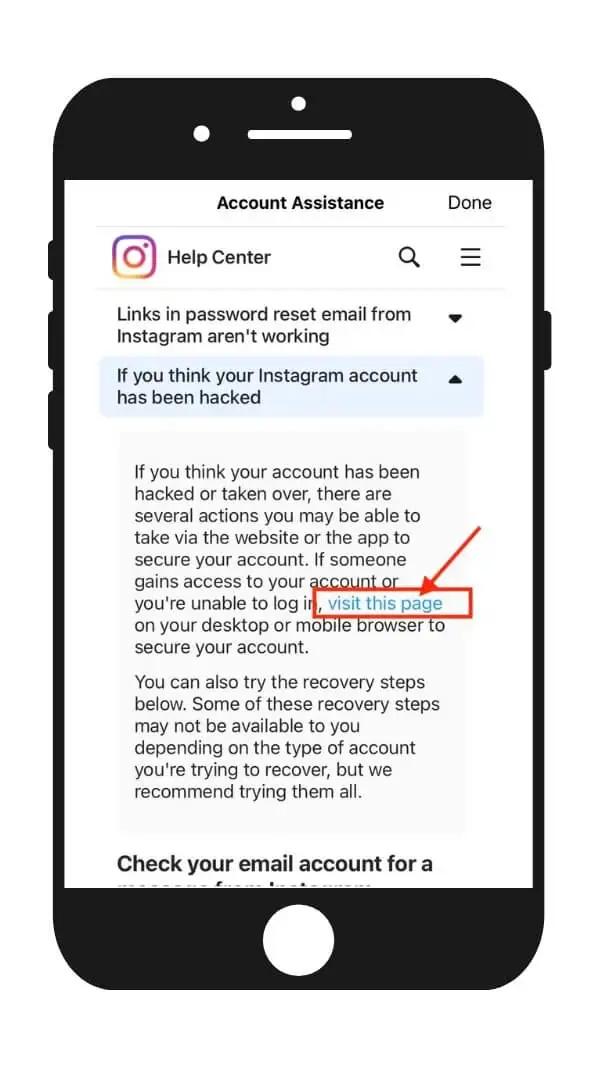
Step 4: Tap "My account was hacked."
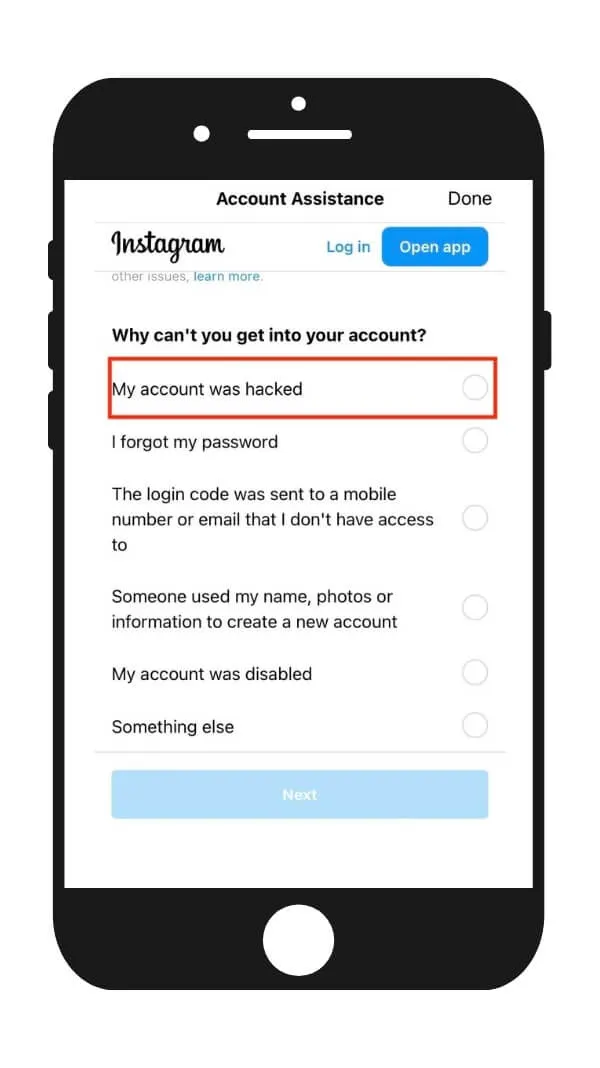
Step 5: Enter your username, email, or phone number to verify your identity. Use the email associated with the Instagram account, and make sure you have access to it.
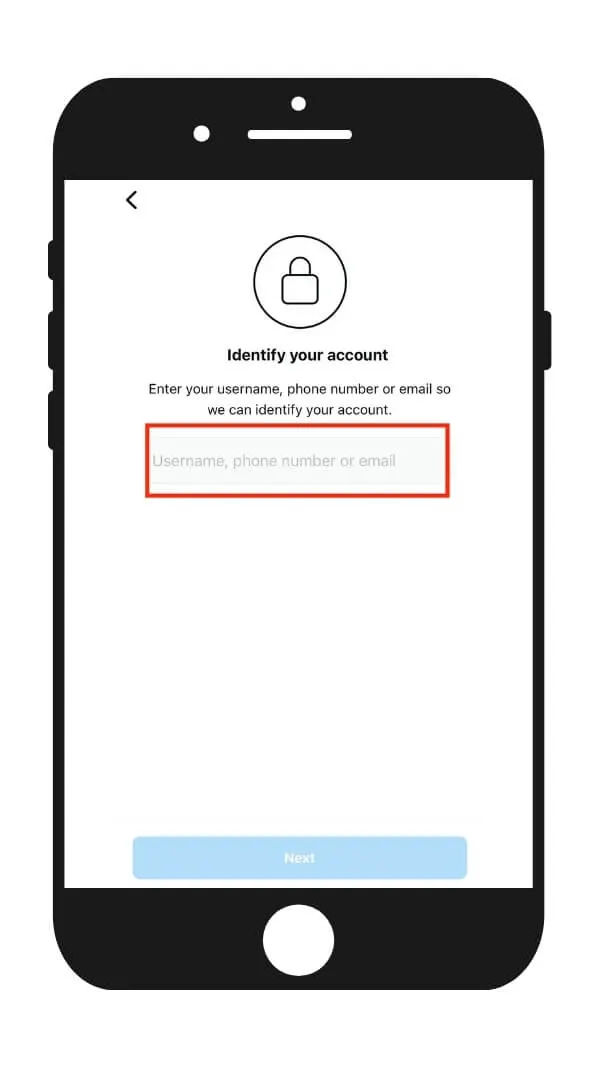
Step 6: You'll receive a verification code via email. Enter it on the next screen.
Step 7: You'll be prompted with two options: "Yes, I have selfies of myself in my account" or "No, I don't have any selfies of myself in my account." Select Option 1 and proceed to take the video selfie. Tap SEND when done.
📸 Selfie video tip: Make sure your hair and makeup closely resemble how you appear in your Instagram posts. If you typically wear makeup in your posts, do so for this selfie too. If your appearance differs significantly, Instagram's system may fail to recognize you and the review will fail. Use bright natural light and a clean white background.
Method 3 — Meta Business Support live chat
The "Facebook backdoor"
This still works in 2026, with caveats. You can only use this if your Facebook account is linked to your Instagram account and your Facebook is still enabled. Log into business.facebook.com with the Facebook account linked to your Instagram. If it's not a business account, create a business page first. Go to Meta Business Help Center → Support → Contact Support. If "Live Chat" or "Email Support" is available (allocated based on account history, not always visible), open it. Tell the agent your Instagram account was disabled in error, give them the username, and ask them to escalate to the Instagram review team. Be specific, polite, factual.
Caveats for Method 3
This channel is most generous to advertisers and business accounts. If you've never run a Facebook ad and have no business pages, the live chat option may not appear at all. In that case, Method 4 or 5 is your route.
Method 4 — Meta Verified support route
Priority support via Meta Verified
Subscribing to Meta Verified (around $12–15/month, billed monthly with no long commitment) unlocks priority support that includes account recovery help. The catch: you can't subscribe with a disabled account, so you need a separate Facebook or Instagram account to subscribe from — and that account must have existed before the suspension. From a clean secondary account (or your Facebook), subscribe to Meta Verified, then go to Settings → Meta Verified → Get Support and open a case. Explain that your primary Instagram account is wrongly disabled and provide the username.
Honest assessment: Meta Verified gets you to a real support agent faster, but the agent's power is still limited by what the policy team allows. It works best for clean false positives, not for genuine community guideline strikes. Starting in 2026, Meta Verified has been giving canned responses to account suspension issues, and most users are not getting actual support from it.
Method 5 — Specialist recovery escalation
If you've cycled through Methods 1–4 with denials, no responses, or no appeal button at all, you're in the territory most generic guides won't help with. At this point, the issue isn't your account — it's that you don't have access to the right escalation channels.
The IG HERO Recovery Guide
The IG HERO Instagram Recovery Guide documents the multi-channel escalation paths used by people who've recovered accounts after final-decision messages, no-appeal-button scenarios, and repeated denials — including a less-known regional appeal channel that routes cases to a different review team. It's the same playbook our recovery specialists use internally on hard cases. Worth using when you've exhausted Methods 1–4 and your account is still inside the 180-day window — or when you want a more strategic approach from day one.
Why Does My Appeal Keep Getting Denied — and Is It Really Over?
About 70% of users who go through the standard in-app appeal (Method 1) get a response saying their data will be permanently deleted. That doesn't mean the actual ending — it means the standard in-app appeal route is closed to you. It does not close Methods 3, 4, or 5.
The real death sentence is the 180-day data retention window expiring. Until that day, you still have hopes — and routes.
The most common reasons appeals get denied
You're appealing the same way the system already rejected you
Resubmitting through the same channel that denied you almost always produces the same result. The algorithm does not "change its mind" without new context.
Your verification photo failed identity match
This often happens with business accounts (or pet, children, or meme accounts that don't have your face on posts). Once flagged "low trust," your appeals get triaged into a non-reviewable bucket — break out via Method 3 or 5.
Your appeal text reads as "guilty + sorry"
Apologizing for something you didn't do tells the reviewer you broke rules. The right tone is calm and factual: "I believe my account was disabled in error. I have not violated [X]. Please review."
Linked-account chain not handled
Both Facebook and Instagram accounts are disabled, but you're only appealing for one of them. The other one needs its own appeal — running in parallel.
"Decision is final" — what it actually means in 2026
The line "We've reviewed your account and our decision is final. You will not be able to request another review" has scared a lot of people into giving up early. In practice:
What "final" really tells you
When recovery is genuinely over
The realistic stopping points: your username has been claimed by another account (visible in search), or 180 days have passed since the disable date with no escalation in progress. If either is true, the most realistic move is to start fresh with prevention done right.
How Long Do I Have to Recover a Disabled Instagram Account?
You have 30 days to submit your strongest appeals and 180 days before Instagram begins permanent data deletion. Recovery success rates drop steeply after day 30 and become very low after day 90. Treat the 30-day mark as the real deadline — 180 days is a buffer, not a plan.
| Timeline | What's happening | Your odds |
|---|---|---|
| Days 0–3 | Case still in active review queue; verification photos are most likely to land a human reviewer | Highest recovery odds |
| Days 4–7 | Use all the methods available in parallel where allowed by your scenario | Still strong |
| Days 7–30 | Standard channel often shuts; appeals get triaged lower; Method 5 becomes the main path | Moderate, declining |
| Days 30–90 | Recovery still happens, but odds are roughly 50% lower than week 1 | Possible, harder |
| Days 90–180 | Data still on Meta's servers; specialist escalation is essentially the only realistic route | Single digits via standard means |
| Day 180+ | Meta begins permanent deletion; the 90-day backup purge follows | Recovery not possible |
Don't trust the generic "you have 180 days" advice as a comfortable buffer. Each week of delay materially lowers your odds. The only number that should anchor your behavior is 30.
What Should I Actually Write in My Instagram Appeal?
The best appeals are short (under 200 words), calm, factual, and structurally similar to a polite customer service email — not an emotional plea. Reviewers are reading dozens of these per shift. The ones that get reinstated state the facts, deny the violation cleanly, and request review without arguing.
Template 1 — First standard appeal (Method 1)
Standard appeal template
Template 2 — Meta Business Support escalation (Method 3)
Business support escalation template
What NOT to write
Don't apologize for things you didn't do
"I'm sorry if I broke any rules" reads as a confession. Reviewers process it as an admission of guilt — even when you're innocent.
Don't beg
"Please please please my whole life is on this account." It doesn't move the queue and it signals desperation, which doesn't help your case.
Don't threaten legal action in the first appeal
Save that for actual escalation if it becomes warranted. Threats in appeal #1 get the case routed away from cooperative reviewers.
Don't write a 1,000-word essay
Reviewers skim. Short, clear, structured wins. And don't lie about your account purpose — if reviewers cross-check, your case dies.
What Can I Do While Waiting for Instagram to Respond?
Use the waiting period to do three things: protect your data, protect your business continuity, and protect your future accounts from the same fate. Most people sit in panic mode for 30 days and lose the chance to do real prevention work — don't be that person.
The waiting-period checklist
Do these while your appeal is in review
If you run a business and the account is your livelihood
Activate backup acquisition channels
Email list, website, ads on a different platform. Don't let one platform outage become a revenue collapse.
Brief your team and VAs that the account is paused
Don't let anyone DM "from" your old account from a different device — that adds suspicious activity to your case during review.
Stop scheduled posts and ad campaigns
Anywhere they touch the disabled asset. Continued automated activity during review can push your case into a worse triage bucket.
Edge Cases & Common Mistakes That Kill Recovery
Most recovery failures are self-inflicted. Recoveries are won and lost in the small operational decisions — what device you log in from, how many times you appeal, whether you create a new account. Here are the ones that quietly destroy the most cases.
The "I keep making new accounts" trap
If you create new Instagram accounts from the same phone, same SIM, same Wi-Fi, and same email-linked Facebook, Meta's device fingerprinting will associate them all. When the original is disabled, the system can preemptively flag the new ones the moment they show any activity. If you must operate during recovery, do it from a genuinely separate device and identity.
The "VPN to a foreign country" mistake
Switching to a VPN from a country your account never logged in from looks identical to an account takeover. Reviewers will deny appeals submitted from anomalous IPs almost reflexively. Appeal from your usual home network, on your usual device.
The 2FA-via-SMS vulnerability
If your 2FA was SMS-only and a hacker SIM-swapped you, what looks like an Instagram disable is actually a takeover. The recovery flow is different — the "my account was hacked" path, not the "my account was disabled" path. Once you're back in, switch to an authenticator app like Google Authenticator or Authy. Never rely on SMS for an account you care about.
The takeaway
A disabled Instagram account is recoverable far more often than the despair on Reddit suggests — but the path to recovery isn't "appeal harder." It's diagnose first, escalate in the right order, and respect the 30-day window like it's a real deadline. The accounts that come back are the ones that stop sending the same email to the same algorithm and start playing the channel-by-channel escalation game the way Meta's system is actually designed to be played.
💡 If you take one thing from this entire playbook: your appeal is a routing problem, not a persuasion problem. Get to a human, give them a clean factual case, and trust the timeline.
Real Case Study: Why Doing Things in the Wrong Order Makes Recovery So Much Harder
Across the many users we've helped, one pattern keeps repeating: most people who fail to recover their account don't fail because the account was truly unrecoverable — they fail because a chain of well-intentioned but wrong moves piled the difficulty up, step by step.
The following is a real comment we received on our blog. We're sharing it (with the user's situation anonymized) because it's one of the most instructive cases we've seen. If you read it carefully, you'll likely spot at least one mistake you were about to make yourself.
📌 The Case
"My Instagram account was disabled without warning on May 4th. It's now May 22nd. When I checked my login history, the day before the disable, multiple unknown devices had tried to log in to my account, and someone had even tried to change my password. The system flagged me for 'integrity violations / fake account.' I've sent emails, even mailed physical letters to the US, submitted selfies, submitted ID photos — and the final result was still permanent disable.
I tried 'Forgot Password' — entered my phone, email, WhatsApp — the screen just kept spinning. No verification code ever arrived. I tried 'Find a Hacked Account' — entering my username returned nothing. I tried Meta AI account recovery — it just said 'this account has been permanently disabled' or 'verification code couldn't be sent.'
My Instagram, Facebook, and Threads are all linked, so when one went down, all three went down. I subscribed to Meta Verified using a family member's account and managed to reach a live agent. They said they'd help submit a review request, but it got stuck for two weeks. Eventually a different agent told me that because I was appealing through a third party's account (my family member's), the workflow couldn't be completed.
Over the past few days I've created 3 backup accounts — same name, same phone number, same email — and all three were banned instantly. So I can't even buy Meta Verified on my own backup account to appeal for myself. Is there anything else I can do?"
🔍 Our Diagnosis: Four Critical Mistakes
This case ended up at "almost no path forward" because of four sequential mistakes — each one amplified the damage of the next.
Treated it as a violation appeal instead of a hacked account
The day before the disable, unknown devices were trying to log in and change the password — a textbook account compromise signal. But the user went straight to the "appeal" flow (defending against a violation) instead of the "my account was hacked" flow. That single wrong turn told the system the user was the one being judged for the integrity violation, and every subsequent appeal fought uphill against that label.
Used someone else's Meta Verified to appeal
The user paid for Meta Verified on a family member's account and tried to appeal their own disabled account through it. Two weeks later, an agent explained the workflow was stuck — Meta Verified support agents only have permissions for the subscriber's own accounts. When Account A's subscriber asks support to fix Account B's problem, the agent literally doesn't have a workflow for it. Canned responses only.
Created backup accounts while still flagged
After the main account was flagged for integrity violation, the user spun up three new accounts with the same name, phone, and email. All banned instantly. This is the most damaging step: it maps directly to Meta's "Evading Enforcement" category — treated as more serious than the original infraction — and now the user's entire digital footprint is flagged.
Bet everything on one channel across three linked platforms
Instagram, Facebook, and Threads were all linked — one falls, they all fall. The user concentrated every appeal on Meta Verified and only found out two weeks later that channel was closed. Each platform's appeal system is partially independent even when accounts are linked — those two weeks should have been split across Facebook's own appeal entry, Instagram's "Forgot Password → Hacked," and the Verified route in parallel.
Correction to Method 4 earlier in this post: Even with a clean secondary account, Meta Verified support can only act on issues for the subscriber's own accounts. If your secondary account isn't a linked account of the disabled one (via Accounts Center), the workflow stalls — exactly like in this case study.
⚠️ Key Takeaways
| Warning Sign | The Right First Move |
|---|---|
| Account hacked or unknown logins | Immediately use "Forgot Password → My account was hacked" — don't wait |
| "Permanently disabled" notice | Screenshot, stop spam-appealing, organize your appeal evidence package |
| Tempted to use someone else's Meta Verified | 99% ineffective — only works if it's your own linked account |
| Tempted to create a backup account now | Don't. Wait at least a month, and never reuse the same identifiers |
| Multi-platform linked accounts | Appeal each platform separately — never bet on a single channel |
📖 If You Don't Want to Repeat This
The part of this case that hurts the most: this user was originally a victim — their account was hacked. But because they didn't understand how Instagram's enforcement logic actually works, every move they made to fix things only confirmed the system's worst suspicions about them. They ended up being treated as the violator.
If you're at the early stage — your account was just disabled and you haven't started spam-appealing yet — this is your golden window. Stop, take a breath, read through the SOP sections above carefully before taking any action.
If you've already made one or two missteps but haven't reached the situation above — stop now.
Don't pile mistake on mistake
Our Disabled Instagram Account Recovery Handbook pairs you with a specialist who will look at exactly where you are and tell you which paths are still open — and which ones you must abandon immediately.
See the IG HERO Recovery Guide →Instagram Disabled-Account FAQ
Will submitting multiple appeals make Instagram recover my account faster?
No — usually the opposite. Meta's system reads duplicate appeals as spam and de-prioritizes them. The accepted rhythm is one appeal per channel, with at least 7 days between resubmissions on the same channel.
Should I use a VPN when submitting my appeal?
No. Appeal from the network and device your account is historically associated with. VPN appeals look like account takeover attempts to Meta's risk system and tend to get denied automatically. Use your home Wi-Fi or your usual mobile data, the same phone you've used in the past year, and the same browser if appealing on desktop.
If my account was disabled, will making a new one also get banned?
Possibly, especially if you reuse the same phone, SIM, email, or device. Meta's fingerprinting links accounts across signals you don't see. If you must operate during recovery, use a genuinely separate identity stack: different email (not just an alias), different phone if possible, avoid reusing your old username or profile picture immediately, and build slowly with no mass following or growth services.
What if my linked Facebook is also disabled?
This is Scenario E — a linked-account chain ban. You should appeal for both accounts independently and simultaneously. Do not fall into the trap of appealing only for the upstream account and hoping the downstream one auto-restores. It usually doesn't.
Can I call Instagram or Meta to recover my account?
No. There is no functioning customer support phone line for disabled account recovery. Recovery happens through online appeal channels, the Meta Business Help Center, Meta Verified support, and specialist escalation routes. Don't call numbers from random Google ads — they're impersonators. If you want the full picture of how Instagram support actually works (and the channels worth trying vs. the ones that don't exist), see our dedicated guide.
Can I sue Instagram or use legal help to recover my account?
For most personal accounts, the cost-benefit doesn't work — Instagram's terms of service give them broad discretion. For business accounts with documented financial loss, attorneys specializing in platform disputes have helped some users get reviews. Do not use Meta's Oversight Board — it does not handle account-disabled issues. Document financial losses if you're a business, and treat legal action as a last resort after Methods 1–5.
How do I prevent this from happening again after I recover?
Once you're back in, the next 30 days are when re-bans happen. Revoke all third-party apps in Settings → Apps and websites, switch 2FA from SMS to an authenticator app and save the backup codes, avoid mass-following or DM bursts, read the Community Guidelines sections most relevant to your niche, and back up your data weekly via Download Your Information.
Does "decision is final" really mean the end?
No, in most cases. That message closes the standard in-app appeal channel — it does not close Meta Business Support, Meta Verified, or specialist escalation routes. It is generated by the algorithm in the majority of cases, not by a human committee. Many recovered accounts received this exact message before being reinstated through escalation channels. Treat "final" as a routing signal, not a verdict.
The Bottom Line
An Instagram account disabled "for no reason" is recoverable far more often than the despair online suggests — but only when you stop appealing harder and start appealing smarter. Diagnose your scenario. Pick the right channel. Respect the 30-day window. Document everything.
If you've genuinely cycled through Methods 1–4 with denials or silence, the path forward isn't more of the same — it's a different escalation channel entirely.
"Your appeal is a routing problem, not a persuasion problem."