IG Hero · Hacked Account Recovery · 2026 Edition
Hacked Instagram Account: Exact Recovery Playbook Including Phone Number and Email Changed Case
Step-by-step recovery — even when the hacker changed your email, phone, and password.
⚡ Quick Take — What You Need to Know
What's in this playbook
- Which recovery path do you need?
- Why should you secure your email before touching Instagram?
- I can still log in — what do I do right now?
- Locked out but I still have my email or phone
- Hacker changed my email AND phone — how do I recover?
- Can a linked Facebook help recover my hacked Instagram?
- Video selfie verification keeps failing — what now?
- How do I use Meta's new Support Hub (2026)?
- None of the DIY methods are working — what else can I do?
- How do Instagram accounts actually get hacked?
- Realistic recovery timeline
- Hacked Instagram account FAQ
In January 2026, a dataset of roughly 17 million Instagram account records appeared on dark web forums. Credential-stuffing attacks surged. Instagram now accounts for 31% of all social media hacks — the highest of any platform. (Source: Station X, 2026)
If you're reading this, your account was probably one of them.
Here's what we see at IG HERO: in 70% of hacked account cases, the account ends up disabled. Hackers post scam content immediately. Instagram's systems flag it. Your account gets shut down for violations you didn't commit. In 50% of cases, linked Facebook and Threads accounts go down too.
Most recovery guides recycle the same Help Center steps. This playbook gives you the actual decision tree — matched to your exact situation.
Stuck on Recovery? Get Expert-Guided Help
The exact forms, selfie fixes, escalation paths, and Meta live support access — mapped to your situation.
Get the Recovery Guide →Which Recovery Path Do You Need?
Match your situation to the right section — don't waste time on steps that don't apply to you.
Can you still log in?
Yes → Section 3: Lockdown — No → Next question.
Do you still control the email or phone on the account?
Yes → Section 4: Password Reset — No → Next question.
Is your Instagram linked to a Facebook you can access?
Yes → Section 6: Facebook Recovery — No → Section 5: Full Lockout
Already tried DIY, still locked out?
Why Should You Secure Your Email Before Touching Instagram?
Your email is the master reset button. If a hacker controls your inbox, every recovery code Instagram sends goes straight to them. Secure the email first, or you'll loop forever.
Stop trying to recover Instagram. Go to your email provider first.
Email & Facebook lockdown (do this now)
Change email password
Unique. Never used elsewhere.
Change Facebook password + enable 2FA
Phishing links often capture all credentials at once. We've seen Facebook hacked days after Instagram.
Check active sessions
Sign out of everything unrecognized. Gmail: Settings → Security → "Your devices."
Check forwarding rules
Hackers set up auto-forwarding. Gmail: Settings → Forwarding and POP/IMAP. Remove anything you didn't add.
Check filters
Attackers create filters that auto-delete Instagram emails. Gmail: Settings → Filters.
Verify recovery phone and email
Make sure both belong to you.
Enable 2FA on email
Authenticator app, not SMS.
Email also hacked? IG HERO's Recovery Guide provides advanced strategy for the Instagram hacked + email compromised case.
I Can Still Log In — What Do I Do Right Now?
Narrow window before the hacker changes your credentials. Change password, enable 2FA, kill sessions, revoke apps. This order. Right now.
5-minute lockdown
Change password
Accounts Center → Password and security. 16+ characters, password manager.
Enable 2FA
Authenticator app, not SMS.
Kill all sessions
Accounts Center → Where you're logged in. Log out everything.
Revoke third-party apps
Accounts Center → Apps and websites.
Verify email + phone
Accounts Center → Personal details.
Check linked accounts
Remove any you didn't add.
⚠️ Settings keep reverting? Your email, device, or a connected app is still compromised. Go back to Section 2.
Locked Out but I Still Have My Email or Phone. How Do I Get Back In?
Hacker changed your password but didn't swap your contact info yet. Use "Forgot password" to send a login link to yourself. Act fast — this window closes once they change your email/phone too.
Search email for messages from security@mail.instagram.com
Find "your email was changed" → click "revert this change" immediately. Check spam.
Instagram login screen
→ "Forgot password?" (iOS) or "Get help logging in" (Android).
Enter username, email, or phone
Whichever you still control.
Follow the login link or enter the code
Check your inbox or SMS.
Run the lockdown sequence immediately
Change password, enable 2FA, kill sessions. See Section 3.
Link never arrives? Check spam, blocked senders, filters. If nothing — hacker already swapped your contact info. → Section 5.
Hacker Changed My Email AND Phone — How Do I Recover?
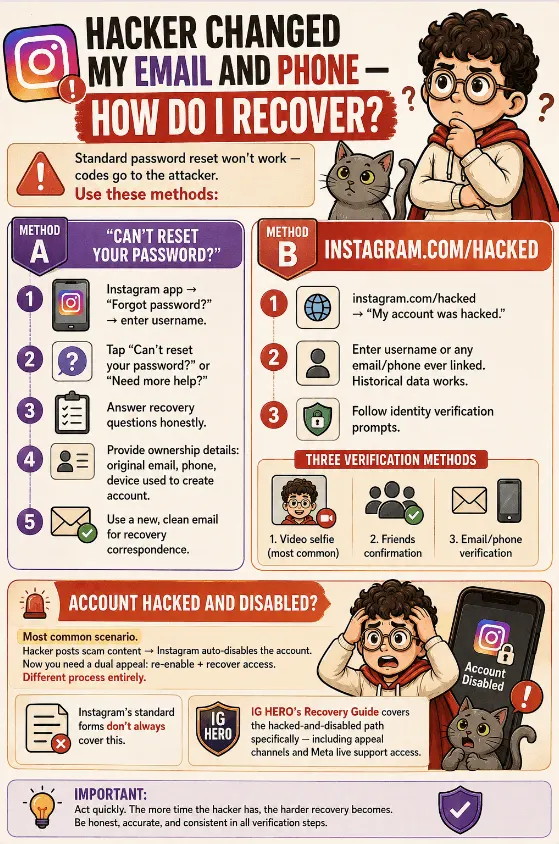
Standard password reset won't work — codes go to the attacker. Use "Can't reset your password?" or instagram.com/hacked. Instagram verifies identity via video selfie, friend confirmation, or historical data. Average recovery: ~15 days.
Method A: "Can't reset your password?"
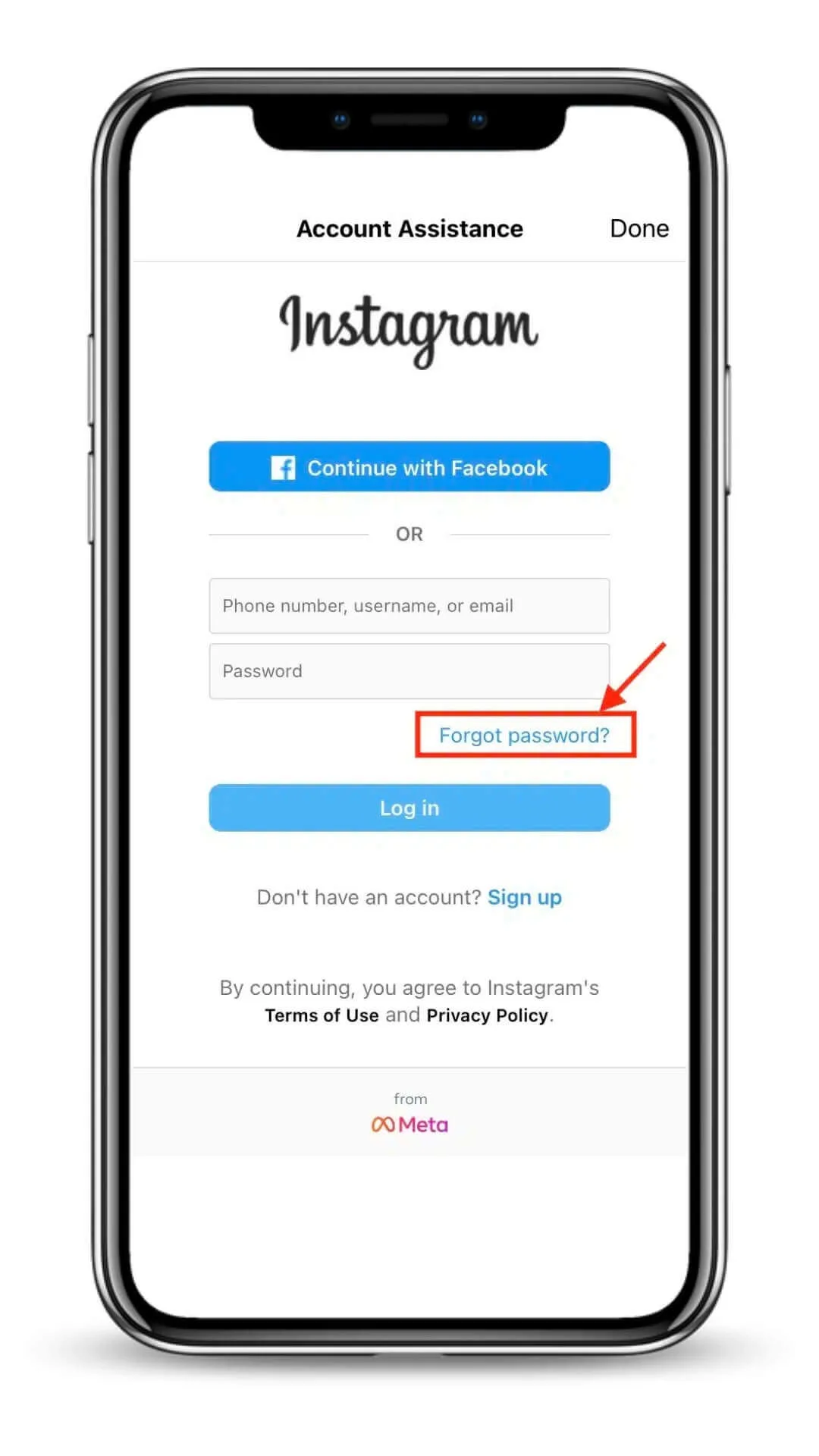
Instagram app → "Forgot password?" → enter username
Start the standard reset flow.
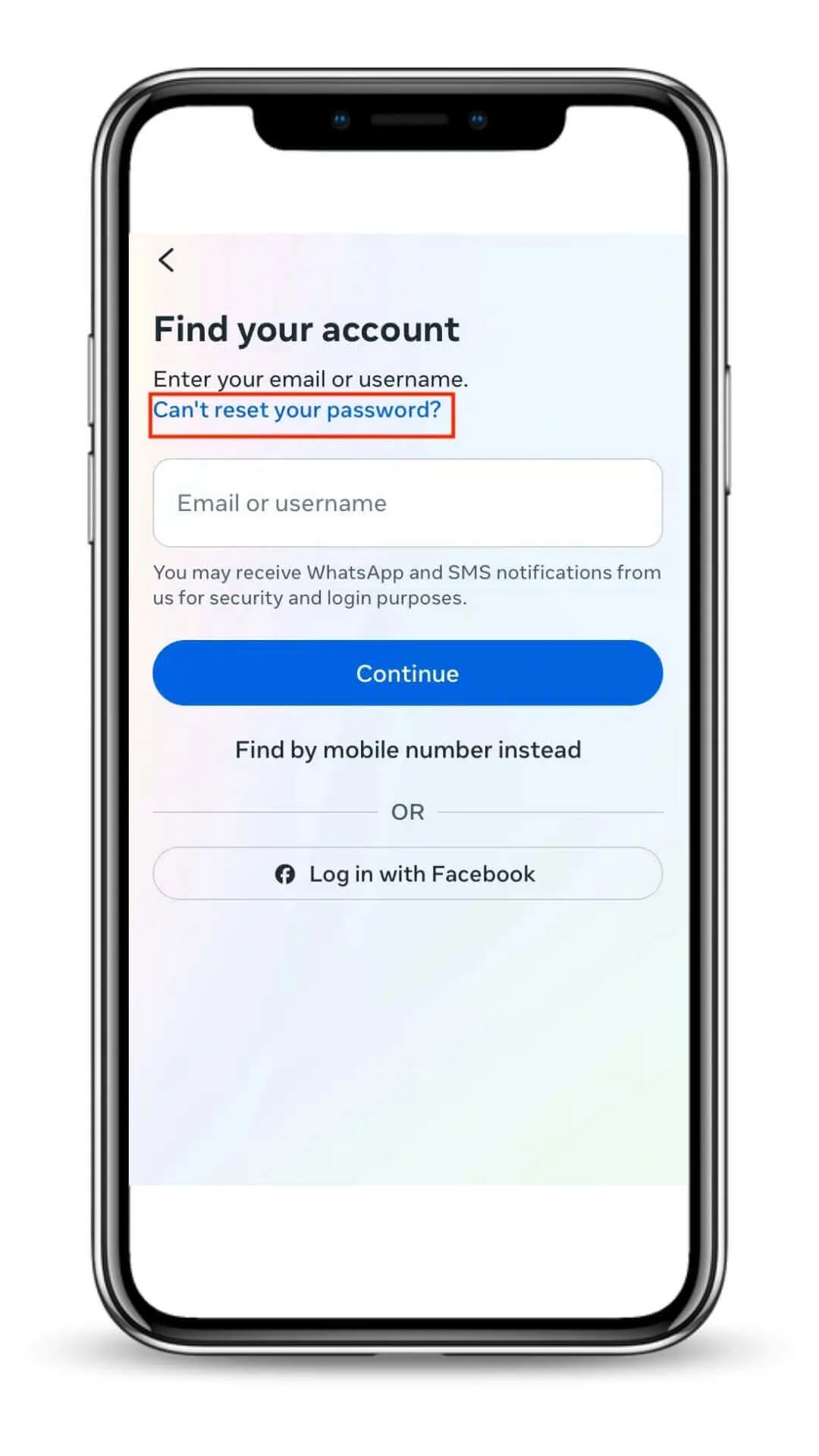
Tap "Can't reset your password?" or "Need more help?"
This appears after the initial reset fails.
Answer recovery questions honestly
Personal or business account, was it hacked, etc.
Provide ownership details
Original email, phone, device used to create account.
Use a new, clean email for recovery correspondence
Don't use an email that may be compromised.
Method B: instagram.com/hacked
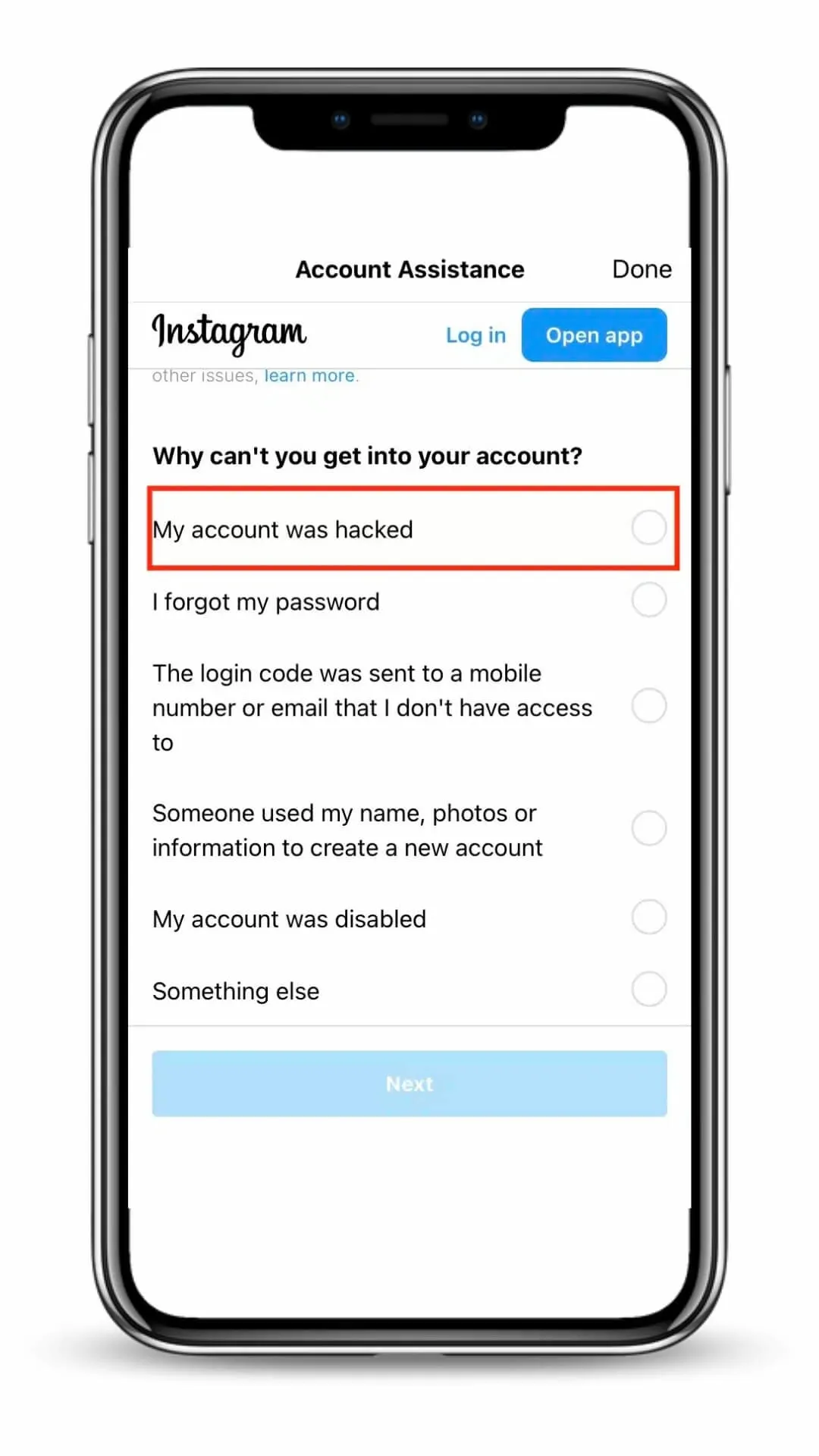
- Go to instagram.com/hacked → "My account was hacked."
- Enter username or any email/phone ever linked. Historical data works.
- Follow identity verification prompts.
Three verification methods
1. Video selfie (most common). Record face, turn head. Matched to profile photos. Takes 1 day to weeks. See Section 7 if it keeps failing.
2. Friends confirmation. For accounts without personal photos (business, brand, pet). Pick friends → they get codes → you submit codes → recovery link sent.
3. Email/phone verification. Rare — Instagram sends code to original contact info.
💡 Don't stop at one method. Try selfie first. Rejected? Switch to friends or email. Different lighting, no glasses.
Account hacked AND disabled?
Most common scenario. Hacker posts scam content → Instagram auto-disables the account. Now you need a dual appeal: re-enable + recover access. Different process entirely.
Instagram's standard forms don't always cover this. IG HERO's Recovery Guide covers the hacked-and-disabled path specifically — including appeal channels and Meta live support access.
Cascade effect: In ~30% of cases, hackers post to linked Facebook and Threads too — even using Meta ads to run fraudulent ads, causing those to get disabled. Secure Facebook first (Section 2).
Don't spam requests. Multiple submissions from multiple devices = flagged as bot. One clear request. Wait. Then try again.
Can a Linked Facebook Help Recover My Hacked Instagram?
Yes — if Facebook is secure, log into Instagram through Facebook. Bypasses the hacker's password. If both were compromised, recover Facebook first.
Facebook secure → direct login
Instagram login screen → "Log in with Facebook" → enter FB credentials → run lockdown (Section 3).
Both hacked
- Recover Facebook: facebook.com/hacked
- Meta Support Hub: Settings → Help & Support → Support Hub.
- Facebook recovered → use it to reclaim Instagram.
Business accounts: Meta offers live chat through Facebook Business Help. Worth trying when forms fail.
Video Selfie Verification Keeps Failing — What Now?
Usually a technical problem, not a face-match problem. Switch devices, fix lighting, or use the uninstall-wait-reinstall method.
Better submission
Natural light (face a window). No glasses/hats. Full face visible. Steady camera.
Different device
Errors/crashes? Borrow someone else's phone.
Facebook face recognition
Facebook app → Settings → Permissions → Face recognition → Turn On. Force-close Instagram. Retry.
Uninstall → wait 3 days → reinstall
Delete app. Wait 3 full days. Reinstall. Many users report the selfie requirement disappears entirely. (Widely reported; not officially documented.)
How Do I Use Meta's New Support Hub (2026)?
Meta launched a centralized Support Hub in late 2025.
Settings → Help → Support Hub. Locked out? Use browser-based tools instead.
What's in it: Unified reporting, AI-powered search. As of now, it provides generic answers as in the Help section. But you can check back from time to time as Meta said they will be updating the support flow.
Browser-based tools (no login needed)
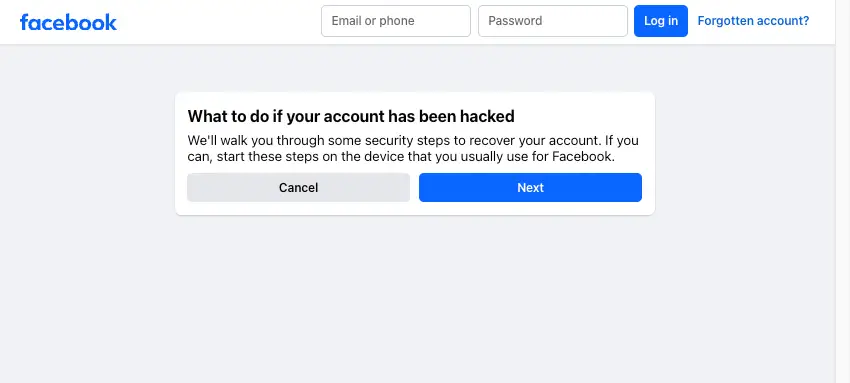
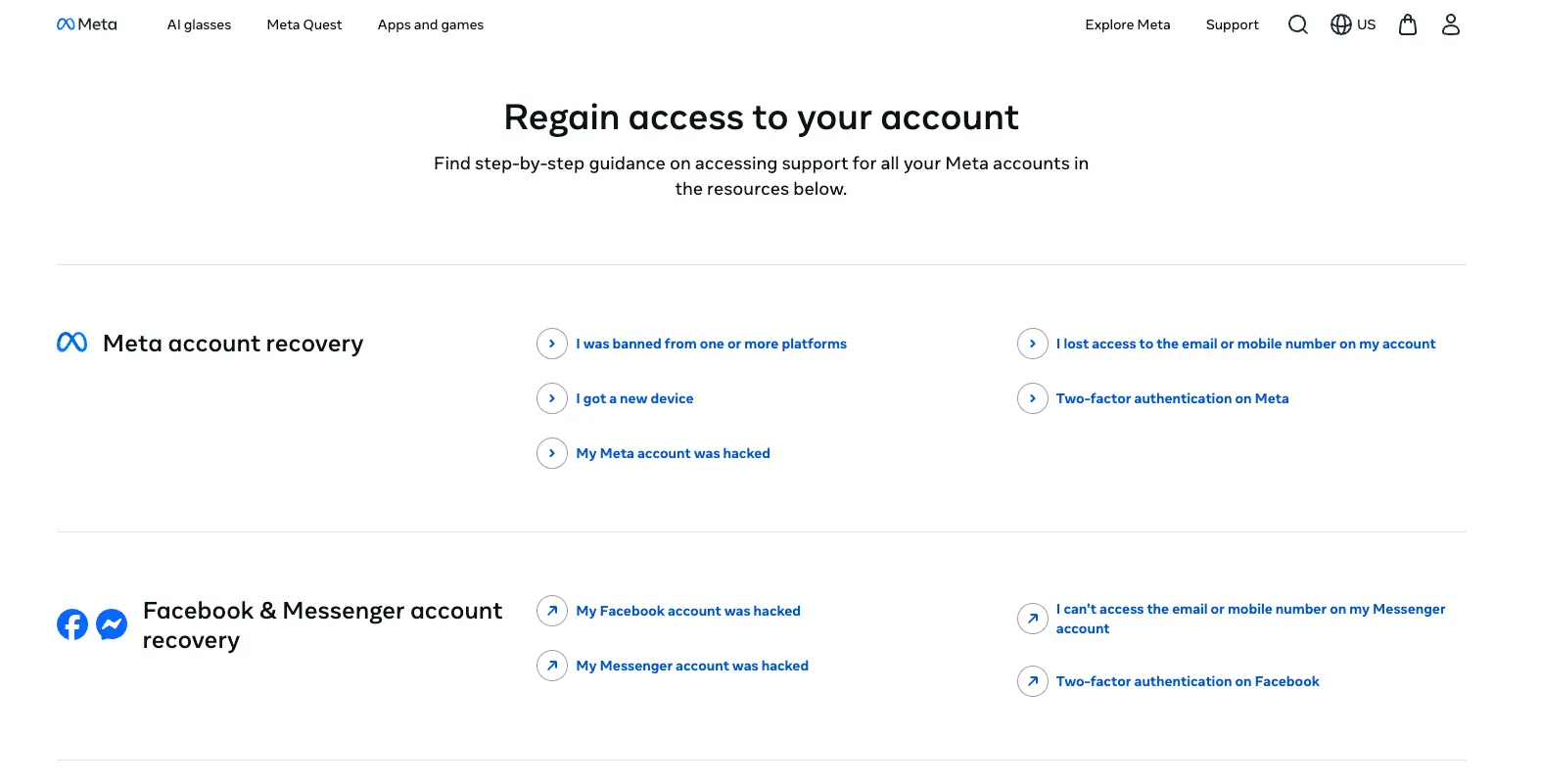
(Source: Meta, Dec 4, 2025, updated March 20, 2026.)
None of the DIY Methods Are Working — What Else Can I Do?
IG HERO's Recovery Guide provides expert-assisted recovery: scenario-matched paths, advanced escalation channels, Meta live support access, and the hacked-and-disabled dual-appeal process most guides don't cover.
What you get
Scenario-matched paths
Your exact situation → the steps that work. Including hacked-and-disabled dual appeal.
Selfie troubleshooting
Device workarounds, Facebook face recognition, timing fixes.
Advanced escalation
Meta live support access, undocumented appeal channels.
Recovery specialist support
Hit a wall? IG HERO's team assists directly.
This is for you if:
- instagram.com/hacked and Forgot Password didn't work.
- Selfie keeps getting rejected.
- Account hacked AND disabled.
- Business owner who can't wait weeks without a plan.
💡 Not a "hack your account back" service — those are scams. The Recovery Guide helps you navigate Instagram's official channels more effectively. Only Meta can restore access.
Stop Guessing. Get the Recovery Guide.
Matched to your exact lockout scenario. Expert-assisted. Step by step.
Get the Recovery Guide →Instagram will NEVER DM you. Notifications come through the app or email (from @mail.instagram.com). DMs claiming to be "Instagram Support" = always fake.
How Do Instagram Accounts Actually Get Hacked?
They don't "break in." They trick you into handing over your credentials. Phishing, credential stuffing, malicious apps.
1. Phishing. Fake email/DM: "Account will be deleted" / "Copyright violation" / "Verification badge." You click, enter password on a fake page. Gone. Sophisticated versions also grab your 2FA backup codes — that's how people with 2FA still lose accounts.
2. Credential stuffing. Reused password. Another service breached. Hackers try the combo on Instagram. #1 attack method at 31% of all social media hacks.
3. Malicious third-party apps. "Follow-Unfollow" app captured your session token.
4. SIM swapping. Hacker transfers your phone number to their SIM. Intercepts SMS 2FA. Use authenticator apps instead.
5. Infostealers. Malware captures passwords from your browser. 184 million credentials found in one infostealer database. (Source: Malwarebytes, 2025.)
Instagram will NEVER DM you. Notifications come through app or email (@mail.instagram.com only). Different domain = fake. DM from "Instagram Support" = always scam.
Realistic Recovery Timeline
| Scenario | Timeline | Method |
|---|---|---|
| Still logged in | 5–15 min | Lockdown (Section 3) |
| Locked out, email/phone yours | 5–30 min | Password reset (Section 4) |
| Everything changed, selfie works | 24–72 hrs | instagram.com/hacked (Section 5) |
| Everything changed, selfie fails | 3–14 days | Support form + alt methods (Sections 5 & 7) |
| Hacked + disabled | 2–4 weeks | Dual appeal (Section 5). Most common. |
| Business + Facebook compromised | 2–6 weeks | Facebook first (Section 6) |
| Tried everything | Faster with escalation | IG HERO Recovery Guide (Section 9) |
Average: ~15 days. Keep appealing for 45 days minimum. (IG HERO case data. Instagram publishes no official timeframes.)
Hacked Instagram Account FAQ
Can someone hack my Instagram just by sending a DM?
No. Reading a DM is safe. Clicking a link inside and entering your credentials is not.
Will Instagram delete my hacked account?
Not automatically. But if the hacker posts content violating policies, Instagram disables it — different, harder recovery. Act fast.
The hacker "deleted" my account — is it gone?
Probably not. Hackers rename accounts, not delete them (a deleted account is useless to them). Ask followers if they see it under a different name. If genuinely deleted: 30-day recovery window.
Should I just create a new account?
Try recovery first. Most accounts are recoverable. Only after you have tried recovery but with no progress — new account is reasonable. Report the hacked one as impersonation.
SMS or authenticator app for 2FA?
Authenticator app. Always. SMS can be intercepted via SIM swapping.
Hacker set up their own 2FA — can I still recover?
Yes. Instagram's identity verification overrides the hacker's 2FA. Once back in, disable theirs and set up yours.
Can I call or chat with Instagram support?
No phone support for hacked accounts. Use the "Can't reset your password?" flow and instagram.com/hacked. Meta live chat may be available for business accounts. IG HERO's Recovery Guide has exact steps for Meta live support.
Account hacked AND disabled — what now?
Most common scenario. Dual appeal needed: re-enable + recover access. Use instagram.com/hacked, or IG HERO's Recovery Guide for the full hacked-and-disabled path.
How long does recovery take?
Minutes to weeks. Average: ~15 days. Keep at it for 45 days. Persistence is the biggest factor.
The Bottom Line
Most hacked accounts are recoverable. Right steps. Right order. Secure email first. Match your path to your lockout level. Once you're in — run the full audit, not just the password change.
"Having trouble with hacked Instagram recovery? Drop your experience in the comments — we try our best to reply to every comment."