IG Hero · Instagram Support · 2026 Edition
Instagram Customer Hotline: Every Real Contact Method That Actually Works (2026 Complete Guide)
No phone number works. No email gets answered. Here's what does — matched to your exact problem.
⚡ Quick Take — What You Need to Know
What's in this guide
- Does Instagram actually have a customer service phone number?
- What are the official ways to contact Instagram support in 2026?
- Which contact method should you use? (Decision tree by issue type)
- Can you get live human support through Meta Verified?
- How do advertisers and business accounts contact Instagram support?
- Does Instagram have a customer service email address?
- What mistakes should you avoid when trying to contact Instagram?
- The bottom line
- Instagram support FAQ
Whenever you run into a problem using Instagram, the most logical thing that comes to mind would be — Google "Instagram customer hotline" looking for a phone number to call.
And you find… nothing that actually works.
Every article gives you the same corporate phone number. You call it. An automated voice tells you to visit meta.com. No human. No help. No resolution.
Look — we've been in this space for years, and the single biggest frustration we hear from creators and business owners is this: it feels impossible to reach a real person at Instagram. The truth is that it's not impossible. It just requires knowing which door to knock on for your specific situation.
This guide maps out every legitimate contact method available in 2026 — organized by the type of problem you're dealing with — so you stop wasting hours on dead-end phone numbers and start getting actual responses.
Hacked or Disabled? Skip the Guesswork.
If your account is hacked or disabled, you don't need to figure out Instagram's maze of support channels alone. Our Instagram Recovery Guide gives you the exact step-by-step path for your situation — and our recovery specialists will assist you through every step until your account is back. No trial and error. No dead ends.
Get the Recovery Guide →Does Instagram Actually Have a Customer Service Phone Number?
No. Instagram (owned by Meta) does not offer a public customer service phone number where you can speak to a live support agent. The number (650) 543-4800 that appears on every third-party website is Meta's corporate headquarters line — it plays an automated recording directing you to visit meta.com and then disconnects. There is no phone queue, no hold music, and no human representative waiting to take your call. (Source: Meta Help Center, 2026)
This is probably the most important thing to understand before you waste 45 minutes trying different numbers: Meta has officially confirmed that they do not provide general public phone support for any of their products, including Instagram.
What About the Phone Numbers Floating Around Online?
There are several numbers you'll encounter when searching. Here's what each one actually does:
| Phone Number | What It Is | Live Agent? |
|---|---|---|
| (650) 543-4800 | Meta/Instagram corporate headquarters line (Menlo Park, CA). Plays automated message directing to meta.com. | No |
| (415) 857-3369 | Alternate Meta corporate number. Same automated recording, same dead end. | No |
| 1-888-851-6382 | Meta Payments support line. Only handles payment/billing issues for Facebook Pay and Meta commerce. | Limited (payments only) |
If you find any other "Instagram support phone number" not listed above — especially numbers that charge per minute or ask for your password — it is almost certainly a scam. Instagram will never call you to ask for your password, two-factor code, or payment information. Scam "support" lines have increased dramatically in 2025–2026, often appearing in Google Ads or social media posts.
Why Doesn't Instagram Offer Phone Support?
Instagram has over 2 billion monthly active users globally. Providing phone support at that scale would require an operation comparable to the largest call centers in the world. Meta's business model for Instagram — a free consumer product funded by advertising — doesn't include the infrastructure or economics for one-on-one phone support for non-paying users.
The exception: paying customers. If you run ads through Meta Ads Manager or subscribe to Meta Verified, you unlock tiered human support. More on that below.
What Are the Official Ways to Contact Instagram Support in 2026?
There are 6 legitimate support channels in 2026: in-app "Report a Problem" forms, the Instagram Help Center, Meta's AI support assistant (new in 2025–2026), Meta Verified live chat/email/callback, Meta Business Support for advertisers, and the instagram.com/hacked recovery portal for compromised accounts. The right channel depends entirely on your account type and the nature of your issue.
Important: You Must Already Be Subscribed or Running Ads Before the Problem Starts. Meta Verified support and Meta Business Support only work for accounts that were already subscribed or actively running ads before the issue occurred. If your account gets hacked or disabled and you then try to create a new account with Meta Verified to fix the original account's problem — it won't work. Support agents can only assist with issues tied to the account that holds the active subscription or ad history. There is no workaround for this. You cannot retroactively buy your way into better support after a crisis has already started.
Let's break down each one — what it actually does, who can access it, and how fast you can expect a response.
1. In-App "Report a Problem" (Available to Everyone)
This is Instagram's primary support channel for all users. It works, but you need to know the exact path.
Open Instagram
Go to the Instagram app and go to your profile.
Tap the menu
Tap the three horizontal lines (☰) in the top right corner.
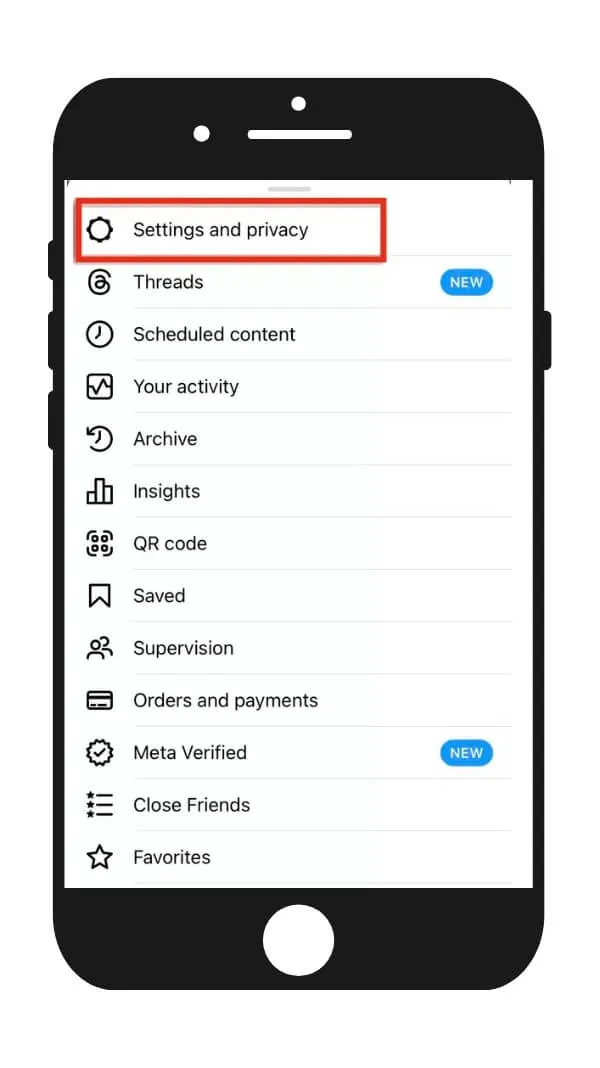
Settings and privacy
Tap Settings and privacy.
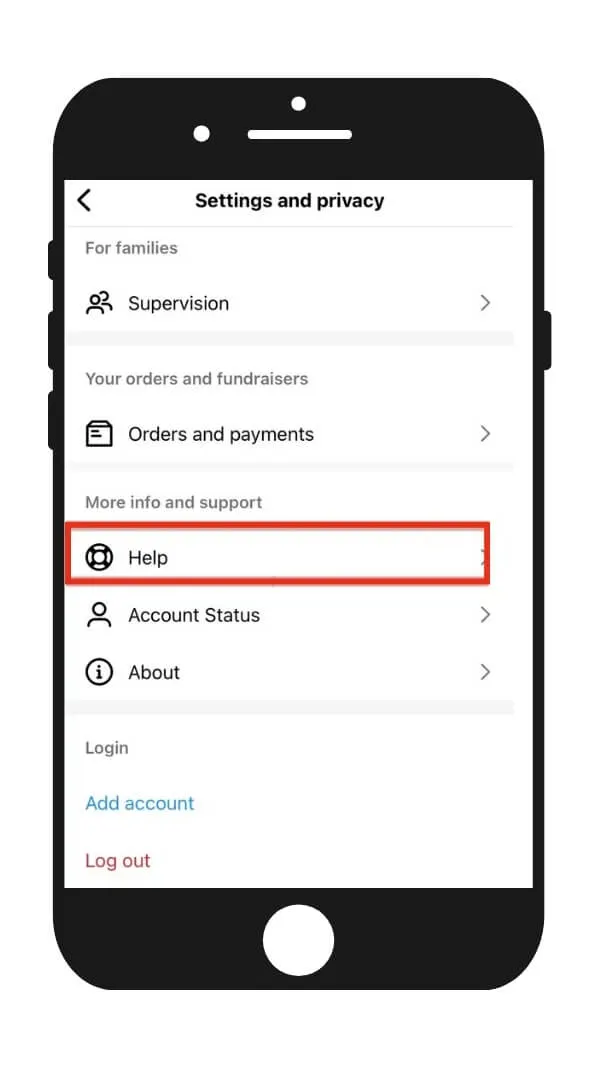
Find Help
Scroll down and tap Help.
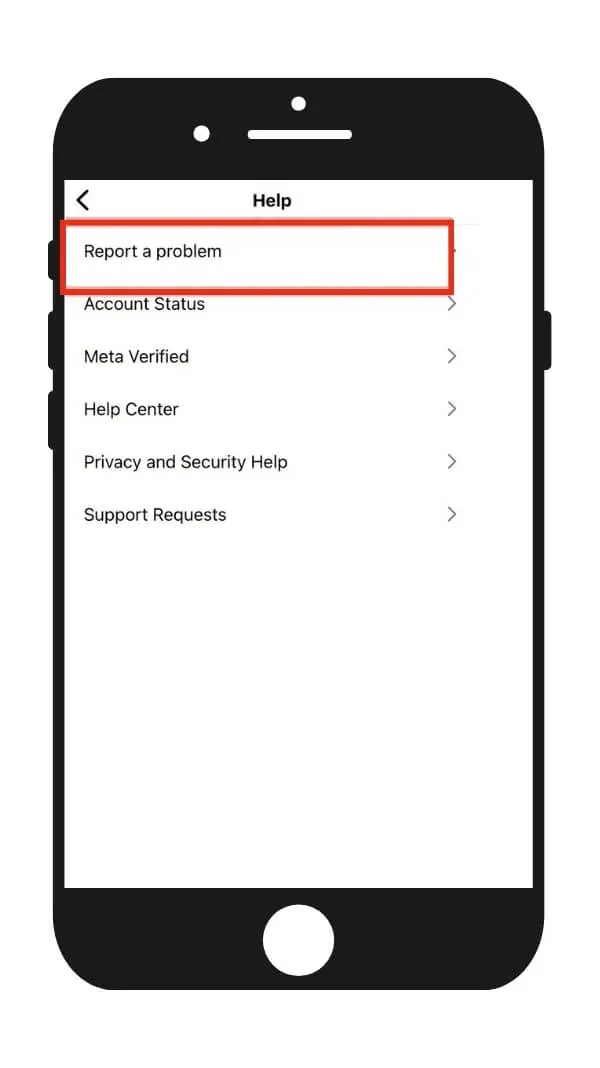
Report a Problem
Tap Report a Problem.
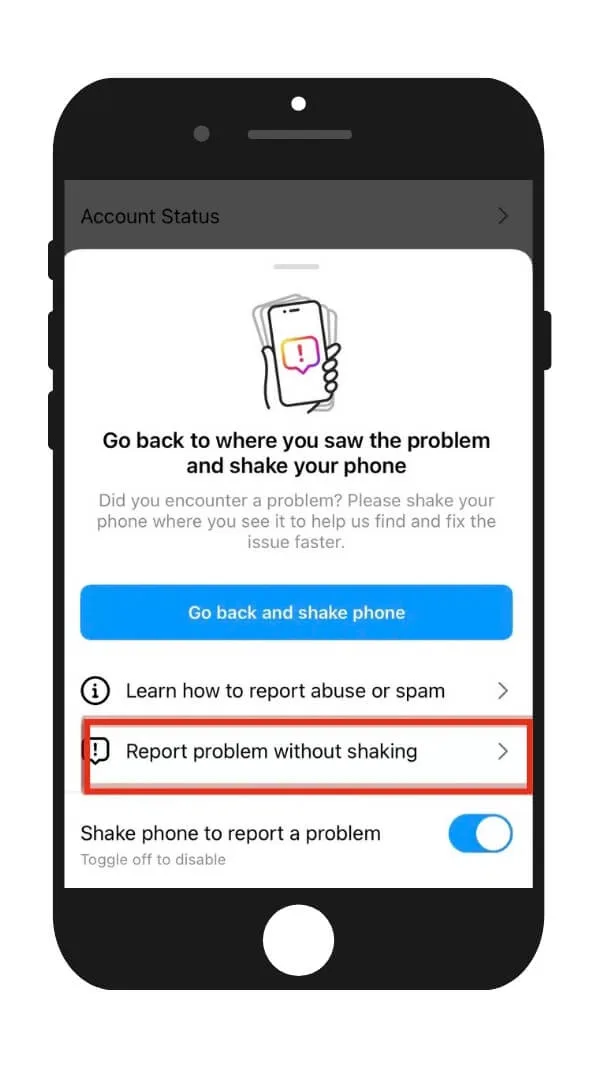
Skip the shake
Select "Report problem without shaking" if prompted.
Include and Continue
Click on Include and Continue.
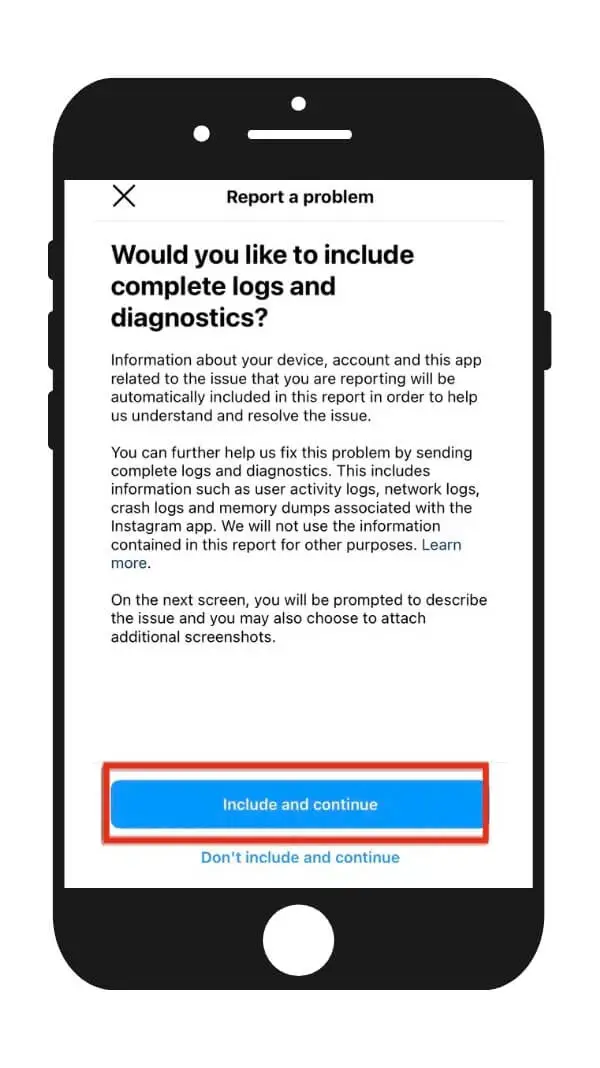
Write your report
Write a detailed description — include your username, what happened, when it started, and any error messages you see.
Send
Attach screenshots if possible, then tap Send.
Expected processing time: 1–7 days for most issues. However, Instagram will not reply back to you in any way. You just need to check the app to see if the problem has gone away.
Account safety issues (hacking, impersonation) tend to get prioritized. General complaints about features or reach can take weeks — or may never get any response.
💡 The quality of your report directly affects how fast you get help. One-line messages like "my account is broken" go to the bottom of the pile. Reports that include your username, a clear timeline, specific error messages, and screenshots get routed to human reviewers faster.
2. Instagram Help Center (Web-Based)
I know everyone hates using the Help Center. But hear me out.
The Help Center at help.instagram.com is a searchable knowledge base with guides for common issues. It's not a contact form — it's a self-service resource. However, certain Help Center articles contain embedded forms or links that route to actual support teams (especially for intellectual property reports, impersonation reports, and account verification issues).
Key direct-access forms within the Help Center:
- Impersonation report: help.instagram.com/contact/636276399721841
- Hacked account: instagram.com/hacked
- Intellectual property violation: accessible through the Help Center's "Privacy and Safety" section
- Deceased user memorialization: dedicated form in Help Center
3. Meta AI Support Assistant (New in 2025–2026)
Meta rolled out an AI-powered support assistant in late 2025, with expanded capabilities launching in early 2026. This AI assistant can answer questions about features, help troubleshoot common issues, and — in a growing number of cases — take direct actions on your account. [Source: Meta Newsroom, Dec 2025 / March 2026]
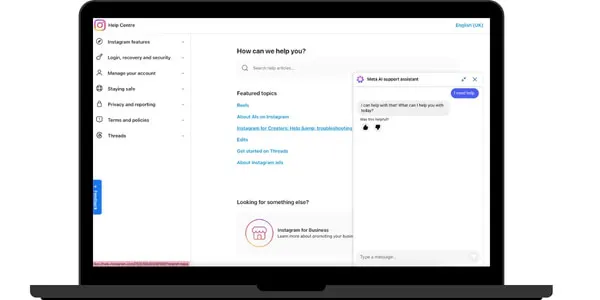
As of early 2026, the Meta AI support assistant is available globally on Facebook and Instagram apps (iOS and Android) and within the Help Center on desktop.
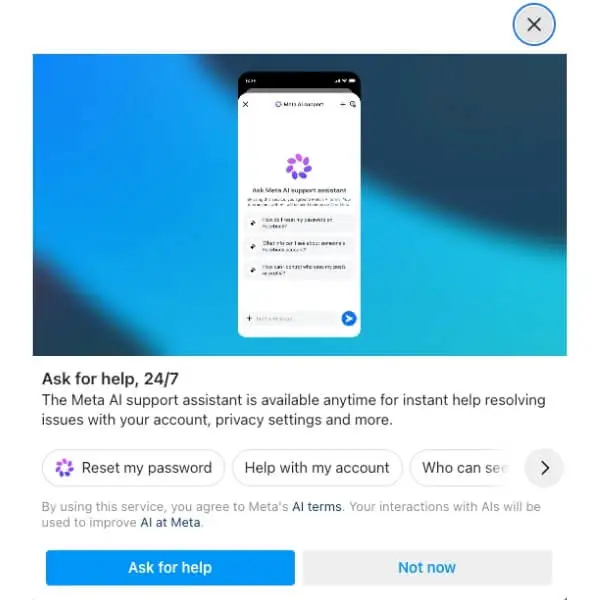
To access it: go to Settings → Help in the app and look for the AI assistant option. It can handle things like explaining notification settings, reporting content, and walking you through the standard in-app account recovery steps.
However, a lot of users reported that the Meta AI Support Assistant just gives them canned responses. The AI Assistant is repeating information from the Help Center in most cases.
What the AI Assistant Can and Can't Do
It can:
- Answer questions about Instagram features and settings
- Walk you through account recovery steps interactively
- Report scam, impersonation, or problematic content on your behalf
- Help you navigate notification settings and privacy controls
- Provide account-specific guidance based on your situation
It can't (yet):
- Override account suspensions or bans — only human reviewers can do this
- Provide refunds for ad spend or in-app purchases
- Guarantee escalation to a human agent (for that, you need Meta Verified)
- Handle complex multi-step account recovery cases where identity verification fails
My take: the AI assistant is genuinely useful for routine questions and simple troubleshooting. For anything involving account access, disabled accounts, or complex issues — it's a starting point, not a solution. Use it to get oriented, then escalate through other channels.
4. Meta Verified Support (Paid Subscribers Only)
This is the only way to access live human agents for Instagram issues. Details in the dedicated section below.
5. Meta Business Support (Advertisers)
If you run ads on Instagram through Meta Ads Manager, you may have access to Meta Business Support, which includes live chat and sometimes phone callback options. Details in the advertiser section below.
6. instagram.com/hacked (Compromised Accounts)
This is Instagram's dedicated recovery portal for hacked accounts. It's separate from the general Help Center and triggers a specialized recovery flow that can include video selfie verification. For more details about hacked account recovery, see our full recovery guide.
Which Contact Method Should You Use? Decision Tree by Issue Type
The fastest way to get help depends on what's wrong. A hacked account, a disabled account, an ad rejection, and a general question each have completely different optimal paths. Using the wrong channel is the #1 reason people feel like Instagram support is impossible to reach — they're knocking on the wrong door.
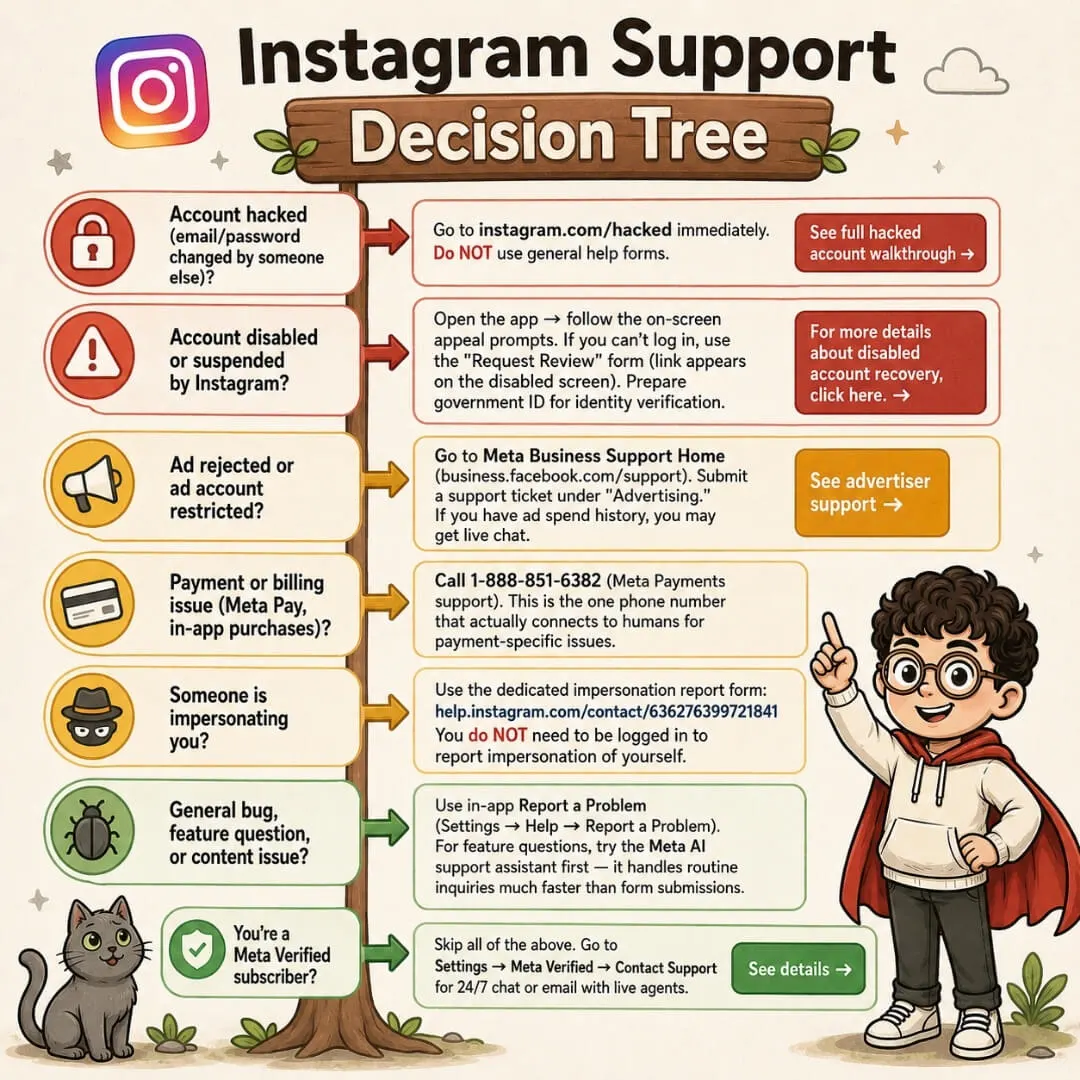
Account hacked (email/password changed by someone else)?
Go to instagram.com/hacked immediately. Do NOT use general help forms.
Account disabled or suspended by Instagram?
Open the app → follow the on-screen appeal prompts. If you can't log in, use the "Request Review" form. Prepare government ID. For more details about disabled account recovery, click here.
Ad rejected or ad account restricted?
Go to Meta Business Support Home (business.facebook.com/support). Submit a support ticket under "Advertising."
Payment or billing issue?
Call 1-888-851-6382 (Meta Payments support). This is the one phone number that actually connects to humans for payment-specific issues.
Someone is impersonating you?
Use the dedicated impersonation report form: help.instagram.com/contact/636276399721841. You do NOT need to be logged in.
General bug, feature question, or content issue?
Use in-app Report a Problem (Settings → Help → Report a Problem). Try the Meta AI support assistant first for feature questions.
Meta Verified Subscriber?
Skip all of the above. Go to Settings → Meta Verified → Contact Support for 24/7 chat or email with live agents.
Live Human Support Through Meta Verified: How It Actually Works
Yes — Meta Verified is currently the only way for individual creators and users to access live human support agents for Instagram issues. Subscribers at the Standard tier ($14.99/month) and above get 24/7 access to email and chat support, with higher tiers also offering callback requests and active case monitoring. However, Meta notes that enhanced support features may not be available to all subscribers at all times as the program evolves. (Source: meta.com/meta-verified)
Meta Verified Support Tiers (2026)
| Plan | Price/Month | Support Access |
|---|---|---|
| Standard | $14.99 | Email + chat with agents 24/7 |
| Plus | $49.99 | Email + chat + faster resolution |
| Premium | $149.99 | Email + chat + callback request + case monitoring |
| Max | $499.99 | Priority support across all channels |
How to Access Meta Verified Support
Open Settings
Open Instagram and go to Settings and privacy.
Meta Verified
Tap Meta Verified.
Contact Support
Tap Contact Support.
Select topic
Select the topic and category for your issue.
Choose channel
Choose your preferred channel: chat, email, or call (availability depends on your plan and region).
Is Meta Verified Worth It Just for Support?
Let me be real with you: Meta Verified support is not what most people imagine when they hear "live chat with a human agent."
Here's what actually happens in most cases. You describe your issue. The agent sends you a Help Center link you could have found yourself. If it's a feature bug or a function that isn't working, they'll tell you they're "opening a ticket and sending it to the internal team for review." Then silence. There's no guaranteed timeline, no follow-up commitment, and no promise that the issue gets fixed.
For disabled accounts and ad disputes, Meta Verified support is especially limited. As of 2026, multiple users report that Verified support agents no longer escalate disabled account recovery cases the way they used to. You'll typically receive canned responses directing you back to the standard appeal process — the same process free users go through. Ad post disputes get similar treatment: the agent logs your concern, but the actual review still happens through Meta's internal moderation pipeline on its own schedule.
Where Meta Verified support does show slightly more value is with hacked account cases. Agents tend to be more active in guiding you through the recovery flow and can sometimes flag your case internally. It's not a guarantee, but it's better than nothing.
And to be clear: Meta Verified does not prevent your account from being disabled. It's not an insurance policy. Paying $14.99/month doesn't give you any special protection against enforcement actions. If Instagram's automated systems flag your content or behavior, your account gets restricted the same way a free account does.
How Advertisers and Business Accounts Contact Instagram Support
If you run ads through Meta Ads Manager, you can access Meta Business Support at business.facebook.com/support — which often includes live chat, and in some cases, phone callback options. This is separate from consumer support and generally provides much faster response times. Your access level typically correlates with your ad spend history: accounts with active campaigns and higher spend tend to unlock more support channels.
Accessing Meta Business Support
Go to Business Suite
Go to business.facebook.com and log into your Meta Business Suite.
Click Help
Click the ? Help icon (usually top-right corner).
Contact Support
Select Contact Support or Get Help.
Choose category
Choose the category that matches your issue (ad rejections, billing, account restrictions, etc.).
Follow prompts
Follow the prompts — if live chat or phone support is available for your account, the option will appear here.
Meta Verified businesses
For Meta Verified businesses, go to Meta Verified → Contact Support for direct access to chat, email, or callback.
Does Instagram Have a Customer Service Email Address?
The commonly cited email address support@instagram.com is no longer actively monitored for incoming user support requests. Instagram's support is now handled entirely through in-app forms, the Help Center, and Meta Verified channels. However, Instagram does send outbound emails from addresses like security@mail.instagram.com for account security alerts — these are legitimate and should not be ignored.
Known Instagram/Meta Email Addresses and What They're Actually For
| Email Address | Purpose | Can You Email Them? |
|---|---|---|
| support@instagram.com | Legacy support address (no longer actively monitored for user requests) | Not effective |
| security@mail.instagram.com | Outbound security alerts (password changes, login attempts, email changes) | Outbound only |
| android-support@instagram.com | Android-specific technical issues | Low response rate |
| phish@instagram.com | Report phishing emails impersonating Instagram | Yes — for forwarding suspicious emails |
| accommodations-ext@fb.com | Accessibility accommodations requests | Specific use only |
Bottom line: email is not a reliable or effective way to reach Instagram support.
What Mistakes Should You Avoid When Trying to Contact Instagram?
The 2 biggest mistakes are: calling phone numbers that lead nowhere, and submitting vague one-line support reports that get deprioritized by Instagram's automated triage systems. Each of these wastes time you could spend on methods that actually work.
"If I call (650) 543-4800 enough times, I'll eventually reach a real person."
Truth: This number plays a recorded message every time, no matter how often you call. There is no hold queue and no human picks up. The automated system simply tells you to visit meta.com.
"I can email support@instagram.com and get my account restored."
Truth: This email address is no longer actively monitored for incoming support requests. In-app reporting and the instagram.com/hacked portal are the actual pathways to account recovery.
Other Common Mistakes That Slow Down Your Resolution
- Spamming the same form repeatedly. Submitting the same recovery request 20 times doesn't speed things up — it can actually flag your submissions as automated and delay processing.
- Not checking your spam folder. Instagram's responses (especially for account recovery) often end up in spam or promotions folders. Check daily.
- Using a VPN when submitting recovery requests. Instagram may flag recovery attempts from unfamiliar IP addresses as suspicious. Use the same network and device you normally use to access your account.
- Not having two-factor authentication set up beforehand. This is a prevention issue, not a contact issue — but it's the single biggest factor in whether you'll need to contact support in the first place.
📋 What to Prepare Before Contacting Instagram Support
The Bottom Line
There is no Instagram customer hotline. There probably never will be. And that's frustrating — but it doesn't mean you're stuck.
The people who successfully resolve Instagram issues in 2026 are the ones who stop searching for a phone number to call and start using the right channel for their specific problem.
What's your experience been with Instagram support? Did any of these methods work for you, or are you still stuck? Drop a comment below — we read every one and try to point people toward the right solution.
Dealing With a Hacked or Disabled Account Right Now?
For hacked and disabled account issues, the most effective and efficient path is our Instagram Recovery Guide. It gives you the proven step-by-step process matched to your exact situation, and our recovery specialists will guide you through every step until your account is restored. No guessing. No dead-end forms. Just the fastest path back to your account.
Get the Recovery Guide →Instagram Support FAQ
Is (650) 543-4800 Instagram's real customer service number?
It's Meta's real corporate headquarters phone number, but it does not connect you to customer service. When you call, you hear an automated recording that directs you to meta.com for help and then disconnects. No human agent is available through this number. The number is tied to Meta's Menlo Park, California headquarters, and multiple consumer advocacy sites confirm no live agent is reachable.
Can I talk to a real person at Instagram in 2026?
Yes, but only through paid channels. Meta Verified subscribers ($14.99+/month) get live chat and email support with human agents. Advertisers with active ad spend may access live chat through Meta Business Support. Free users do not have access to live human support — only the AI assistant, in-app forms, and Help Center articles.
How long does Instagram support take to respond?
Response times vary dramatically based on the channel and issue type. Meta Verified live chat responds in minutes to hours. Support forms for complex cases take 1–7 business days. General feature complaints or reach issues may take weeks, or receive no personal response at all.
Does the 1-888-851-6382 number actually work for Instagram issues?
That number is Meta Payments support — it connects to real humans, but only for payment and billing issues related to Meta Pay, Facebook/Instagram commerce, and in-app purchases. It will not help with hacked accounts, disabled accounts, content removal, or general Instagram problems. If you describe a non-payment issue, they'll direct you to the Help Center.
Can I visit Instagram or Meta headquarters in person for support?
No. Meta's headquarters at 1 Hacker Way, Menlo Park, CA (and Instagram's original office at 181 South Park Street, San Francisco, CA) do not provide walk-in customer service. The addresses are for corporate operations and legal correspondence only. There is no reception desk for customer support at any Meta office, and visiting in person will not escalate your case.
Are third-party "Instagram recovery services" legitimate?
The vast majority are scams. No external company has privileged access to Instagram's internal systems. Only Meta can restore account access through their official channels. Any service asking for your password is a scam. Services charging upfront fees for "guaranteed recovery" are exploiting people in crisis. If you need guided help, our Instagram Recovery Guide walks you through the official process with specialist support.
Does Meta Verified protect my account from being disabled?
No. Meta Verified does not prevent enforcement actions against your account. If Instagram's automated systems flag your content or behavior, your account gets restricted the same way a free account does. The subscription provides a verification badge and access to live support agents — but it is not an insurance policy against account suspension.
What is the fastest way to recover a hacked Instagram account?
Go to instagram.com/hacked immediately from a device you've previously used to access your account. If the hacker hasn't changed your email yet, check for a security alert from Instagram and click "Revert this change" — that's the fastest fix (instant). If your email and phone were both changed, complete the video selfie verification, which typically takes 24–48 hours. For a complete step-by-step walkthrough, see our Instagram Recovery Guide.
The Bottom Line
There is no Instagram customer hotline, and there probably never will be. But that doesn't mean you're helpless. The 6 contact methods in this guide cover every scenario — from general bugs to hacked accounts to ad disputes. The key is matching your specific problem to the right channel instead of wasting time on dead-end phone numbers.
And if you're dealing with a hacked or disabled account, don't go it alone — our recovery guide and specialists are here to walk you through the fastest path back.
"Instagram won't pick up the phone. But now you know exactly which doors actually open."